Gatekeeper is a safety layer for LLM agents. When an agent decides to call a tool (like reading, writing, or deleting a file), Gatekeeper intercepts that call and checks it against active policy rules—such as directory sandboxing, token budgets, and human-in-the-loop approvals—before letting it execute.
The repository is structured as a monorepo containing a Next.js frontend, an Express API backend (which manages the LLM agent and policy engine), and a custom Model Context Protocol (MCP) server for file system operations.
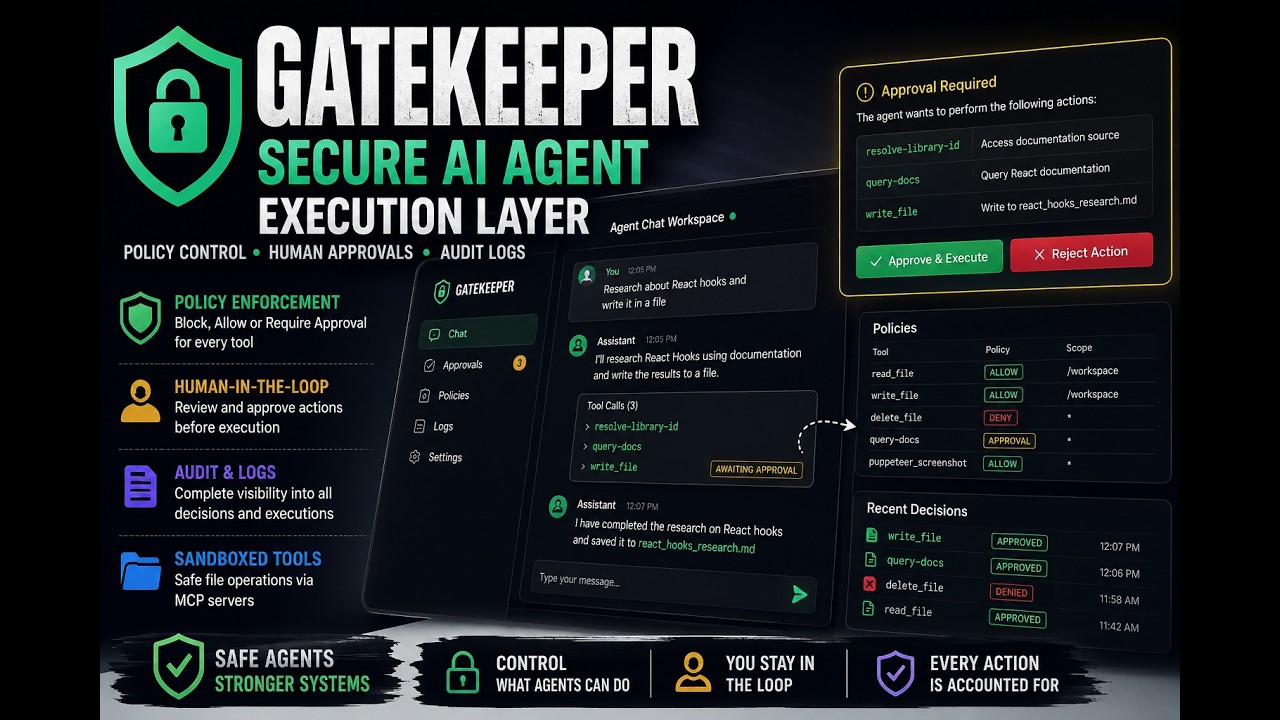
Here is how the frontend, backend, and MCP servers communicate:

- Frontend: A Next.js dashboard providing a chat interface, policy management panel, approval queue, and audit logs.
- Backend: An Express server running the LLM agent loop (supporting Gemini 2.5 Flash and Grok), the policy engine, and the MCP client.
- MCP Servers: Subprocesses spawned by the backend over Stdio. This includes a custom file-manager-mcp for safe file operations, and external servers like
@upstash/context7-mcp(for fetching documentation) and@modelcontextprotocol/server-puppeteer(for web browsing).
The system runs on an interception and evaluation loop. Here is the actual flow:

Below is the step-by-step block diagram of the workflow:
                  ┌──────────────────────────────────────────────┐
                  │                 USER / CLIENT                │
                  └──────────────┬────────────────────────▲──────┘
                                 │                        │
                   (User Prompt) │                        │ (Response)
                                 ▼                        │
                  ┌───────────────────────────────────────┴──────┐
                  │                  LLM AGENT                   │ ◄───────────────────────────┐
                  │           (Gemini / Grok Loop)               │                             │
                  └──────────────┬───────────────────────────────┘                             │
                                 │                                                             │
                  (Generates Tool│ Call: e.g. "deleteFile")                                    │
                                 ▼                                                             │
                  ┌──────────────────────────────────────────────┐                             │
                  │                POLICY ENGINE                 │                             │
                  │   Evaluates:                                 │                             │
                  │   - Block Check (block.ts)                   │                             │
                  │   - Sandbox Path Check (pathRule.ts)         │                             │
                  │   - Token Budget Check (budget.ts)           │                             │
                  │   - Manual Approval Check (approval.ts)      │                             │
                  └──────────────┬───────────────────────────────┘                             │
                                 │                                                             │
                                 ▼                                                             │
                   [ Evaluates Decision Outcome ]                                              │
                    /            │            \                                                │
                   /             │             \                                               │
           (ALLOW)               │ (DENY)       \ (PENDING)                                    │
           /                     │               \                                             │
          ▼                      ▼                ▼                                            │
  ┌───────────────┐      ┌───────────────┐   ┌────────────────────────┐                        │
  │ MCP Registry  │      │ Write Audit   │   │ Create DB Approval     │                        │
  │ & Exec Client │      │ Log to DB     │   └───────────┬────────────┘                        │
  └───────┬───────┘      └───────┬───────┘               │                                     │
          │                      │                       ▼                                     │
          ▼                      ▼               ┌────────────────────────┐                    │
  ┌───────────────┐      ┌───────────────┐       │ Show in Admin Panel    │                    │
  │ Execute Tool  │      │ Return Error  │       │ (Awaiting User Action) │                    │
  │ on MCP Server │      │ to LLM Agent  ├──────►└───────────┬────────────┘                    │
  └───────┬───────┘      └───────┬───────┘                   │                                 │
          │                      │                           │                                 │
          ▼                      │                           ▼                                 │
  ┌───────────────┐              │                  [ User Decides ]                           │
  │ Return Output │              │                   /            \                            │
  │ to LLM Agent  ├──────────────┘                  /              \                           │
  └───────────────┘                          (Approve)             (Reject)                    │
                                               /                      \                        │
                                              ▼                        ▼                       │
                                      ┌───────────────┐        ┌───────────────┐               │
                                      │ Update status │        │ Update status │               │
                                      │ to APPROVED   │        │ to REJECTED   │               │
                                      └───────┬───────┘        └───────┬───────┘               │
                                              │                        │                       │
                                              ▼                        ▼                       │
                                      ┌───────────────┐        ┌───────────────┐               │
                                      │ Resume Agent  │        │ Resume Agent  │               │
                                      │ Loop with     │        │ Loop and      │               │
                                      │ Tool Allowed  │        │ Deny Tool     │               │
                                      └───────┬───────┘        └───────┬───────┘               │
                                              │                        │                       │
                                              └────────────────────────┴───────────────────────┘
ALLOW: The tool runs immediately. The MCP client performs the operation and returns the outcome to the LLM agent.DENY: The tool is blocked. A denial log is written to the database, and the error is returned to the agent.PENDING: Execution is suspended. The engine writes an approval record to the SQLite database and pauses the loop. Once a user clicks Approve or Reject in the frontend UI, the backend resumes the loop to process the tool call.
- apps/api:
- src/index.ts - The Express app entry point.
- src/agent/loop.ts - The execution loop managing LLM calls, step generation, and policy enforcement.
- src/policy/decision.ts - Orchestrates the database check, logging, and state management for approvals.
- src/policy/engine.ts - Runs the pipeline of rule checks (Block -> Path Sandbox -> Budget -> Approval).
- mcp/bootstrap.ts - Spawns and manages standard input/output connections to MCP servers.
- apps/web:
- app/chat/page.tsx - Next.js chat interface to talk with the agent.
- app/approvals/page.tsx - Interactive queue to approve or reject pending tool calls.
- app/policies/page.tsx - Form to configure path rules, block lists, and approvals for each tool.
- apps/file-manager-mcp:
- src/tools/ - The safe filesystem tools:
deleteFile,listFiles,moveFile,readFile, andwriteFile.
- src/tools/ - The safe filesystem tools:
- packages/db:
- prisma/schema.prisma - Prisma schema using SQLite. Stores audit logs, policies, pending approvals, and token budget conversation sessions.
Follow these steps to set up and run the application locally.
Ensure you have Node.js (>= 18) installed, then run the following in the project root:
npm installCopy the sample environment file and fill in your keys:
cp .env.sample .envOpen .env and populate the following keys:
GEMINI_API_KEY: API key for Gemini 2.5 Flash.GROK_API_KEY: Fallback xAI Grok API key.CONTEXT7_API_KEY: (Optional) Upstash context7 API key for documentation querying.- Or set
MOCK_LLM=trueto test the agent loop offline with mock responses.
Run Prisma migrations to set up the database tables:
npm run db:generate -w @repo/db
npm run db:push -w @repo/db
Note
Why SQLite? SQLite is intentionally chosen for this proof-of-concept to keep local setup, testing, and portability simple with zero configuration. For a production deployment with high concurrency, PostgreSQL is recommended and can be easily swapped in via Prisma.
Start the frontend, backend, and build watcher concurrently:
npm run devOnce started, you can access the application at:
- Frontend: http://localhost:3000
- Backend API: http://localhost:3001
You can run vitest suites to verify all rules and server communication:
# Run backend API tests
npm run test -w api

# Run file-manager tests
npm run test -w file-manager-mcpGateKeeper uses stdio-based MCP servers, SQLite persistence and Puppeteer.
The complete end-to-end system is demonstrated in the attached recording.
A production deployment would typically run on a VM/container environment such as GCP Compute Engine.