
A modern pet adoption platform built for shelters, adopters, and pet owners.
Pawly is a full-stack pet adoption portal that connects adopters with pets available for adoption. The platform enables authenticated users to browse pets, view detailed profiles, submit adoption requests, and manage their own requests. Pet owners can add, update, delete listings, and manage approvals from a unified dashboard.
- Live Site: https://pawly-client.vercel.app
- Client Repository: https://github.com/toufiqweb/pawly-client
- Server Repository: https://github.com/toufiqweb/pawly-server
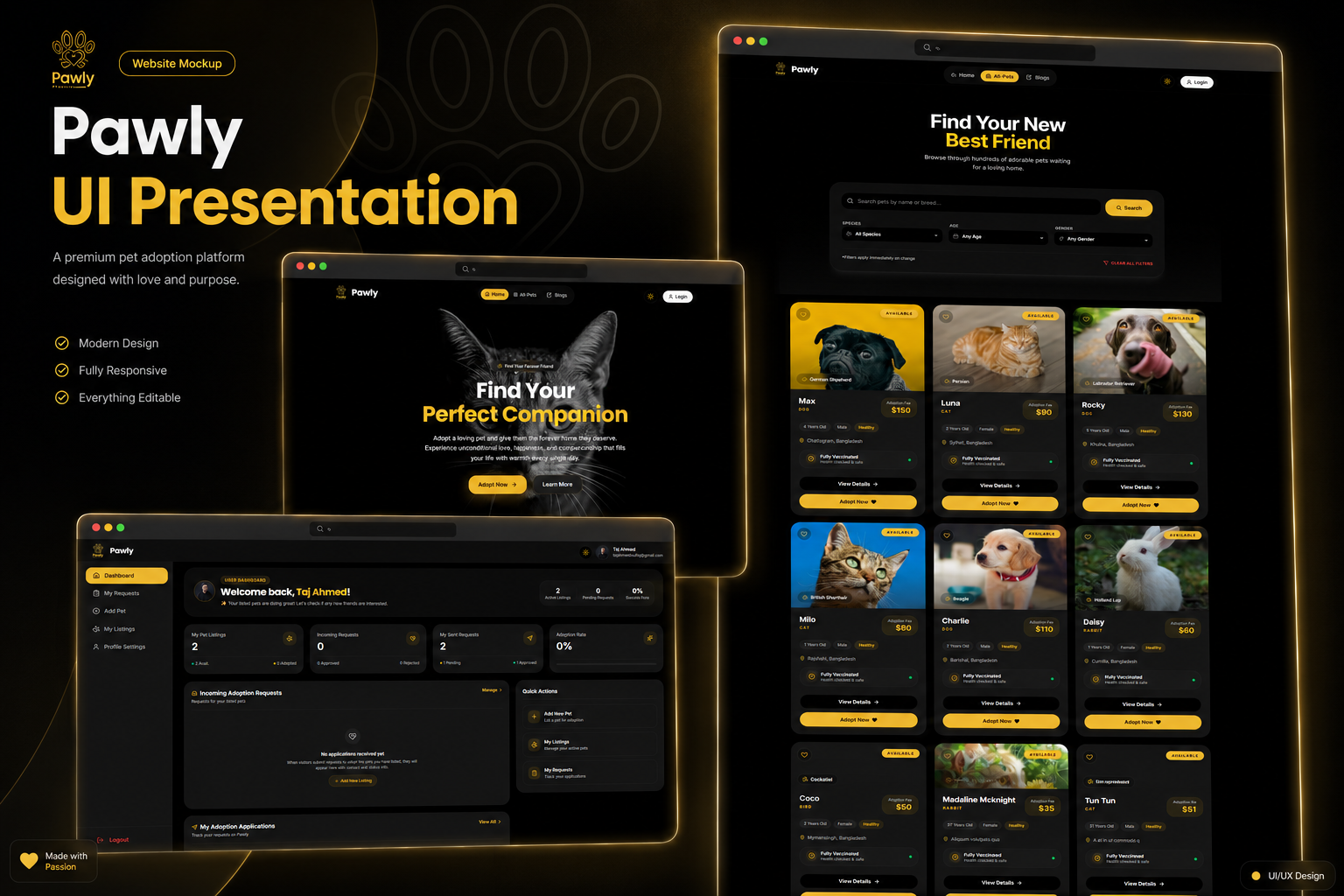
- Dynamic User Profile Dashboard: Manage detailed profile fields (bio, experience, phone, location, social handles) with real-time Better Auth session updates and custom MongoDB synchronization.
- Premium Custom Loading System: Custom conic-gradient spinning paw loaders (
Loader.jsxwith inline, section, and page sizes) and route-levelPetLoadingScreenloaders integrated across all critical routes. - Standardized Notification Flow: Context-aware
toast.loading -> toast.success / toast.errorflows wired through unique identifiers (toastId) for forms, adoption submissions, and admin actions. - Browse pets by category, species, and keyword search with dynamic query filtering.
- Secure authentication with email/password, Google social login, and JWT session management.
- Pet owner dashboard with listing creation, edit, delete, and request management.
- Adoption request workflow with approval and rejection controls.
- Responsive design optimized for mobile, tablet, and desktop screens.
- Featured pets and curated home sections for a recruiter-friendly landing experience.
- Frontend: Next.js 16, React 19
- Backend: Node.js, Express (backend repository)
- Database: MongoDB Atlas
- Authentication: Better Auth, JWT, Google OAuth
- Styling/UI: Tailwind CSS v4, HeroUI, Lucide icons, Framer Motion, Next-Themes
next→ React framework for server-side rendering and routing.react/react-dom→ Core UI library and rendering engine.better-auth→ Authentication provider and session management.@better-auth/mongo-adapter→ MongoDB adapter for Better Auth.react-hot-toast→ Inline toast notification support.framer-motion→ Smooth UI animations.lucide-react→ Modern icon library.react-icons→ Supplementary icon sets.mongodb→ MongoDB database driver.@heroui/react→ UI components and modal support.tailwindcss→ Utility-first styling framework.next-themes→ Light/Dark mode state management.
src/
  app/
    (main)/
      page.js
      all-pets/
        loading.js
        page.jsx
        [petId]/
          loading.js
          page.jsx
    dashboard/
      layout.js
      page.js
      loading.js
      add-pet/
        loading.js
        page.jsx
      my-listings/
        loading.js
        page.jsx
        edit/[id]/
          page.jsx
      my-requests/
        loading.js
        page.jsx
      profile/
        loading.js
        page.js
  components/
    authPages/
      LoginForm.jsx
      RegisterForm.jsx
    dashboard/
      AddPetForm.jsx
      ListingCard.jsx
      MyAdoptionRequests.jsx
      RequestsModal.jsx
      UpdatePetForm.jsx
    ui/
      Loader.jsx
      PetLoadingScreen.jsx
      PetCard.jsx
      PetDetailAdoptForm.jsx
      PetSearchSection.jsx
      OwnerWarningCard.jsx
  lib/
    auth.js
    auth-client.js
    data/
      pets.js
      requests.js
public/
  assets/
  images/
Create a .env.local or .env file with the following values:
NEXT_PUBLIC_API_URL=https://pawly-server.vercel.app
BETTER_AUTH_URL=http://localhost:3000
BETTER_AUTH_SECRET=<your-better-auth-secret>
MONGODB_URI=<your-mongodb-connection-string>
GOOGLE_CLIENT_ID=<your-google-client-id>
GOOGLE_CLIENT_SECRET=<your-google-client-secret>- Clone the repository
git clone https://github.com/toufiqweb/pawly-client.git cd pawly-client
2. Install dependencies
   ```bash
npm install
- Add environment variables
- Copy the example values into
.env.local - Provide your MongoDB and Better Auth credentials
- Copy the example values into
- Run the development server
npm run dev
5. Open the app
   - Visit `http://localhost:3000`


## Available Scripts

```bash
npm run dev
npm run build
npm start
npm run lint
| Method | Route | Description |
|---|---|---|
| GET | /api/profile |
Fetch database representation of user profile |
| PUT | /api/profile |
Update database and Better Auth session details |
| GET | /pets |
Fetch all pet listings |
| GET | /pets/:id |
Fetch a pet by ID |
| POST | /pets |
Create a new listing |
| PATCH | /pets/:id |
Update pet details |
| DELETE | /pets/:id |
Delete a pet listing |
| GET | /listings |
Fetch owner-specific listings |
| GET | /requests |
Fetch adoption requests |
| POST | /adoption-requests |
Submit a new request |
| PATCH | /requests/:id |
Approve or reject adoption requests |
Pawly uses JWT-based authentication through Better Auth. The application supports:
- Email/password login and registration
- Google social login
- Persistent protected routes for dashboard and adoption workflows
- Secure token storage for API calls and route protection
Protected pages include:
Add PetMy ListingsMy RequestsPet Detailsadoption form (when authenticated)
The UI is designed to respond cleanly across devices:
- ✅ Mobile
- ✅ Tablet
- ✅ Desktop
- Add wishlist/favorites for adopters
- Add real-time chat between adopters and owners
- Improve filter options with breed, age, and location ranges
- Add email notifications for approved requests
- Add admin dashboard for shelter management
- Integrating Better Auth with custom JWT-backed API routes.
- Keeping private routes stable during refresh and session updates.
- Managing MongoDB query filters for search and species filtering.
- Designing a clean dashboard experience for both pet owners and adopters.
- How to integrate modern Next.js app routing with auth middleware.
- Best practices for client-side fetch and protected API calls.
- Improving UX using toast notifications and responsive layout patterns.
- Building a feature-rich CRUD workflow for full-stack applications.
- Cached server data requests with
fetch()andno-storewhere required. - Minimized bundle weight using optimized Next.js imports.
- Used lightweight UI components and Tailwind CSS utility classes.
- Added loading states to improve perceived performance.
- Frontend deployed on Vercel.
- Backend expected to run on Vercel / Render with secure environment variables.
- Ensure all routes are configured to avoid 404/504 on refresh.
- Name: Toufiq Alahe
- Portfolio: https://toufiq-portfolio.vercel.app
- LinkedIn: https://linkedin.com/in/toufiq-alahe-dev
- GitHub: https://github.com/toufiqweb
Distributed under the MIT License. See LICENSE for more information.