


This project is a fork of CheatingDaddy with modifications and enhancements. Thanks to Soham and all the open-source contributors who made this possible!
🤖 Fast, light & open-source—Glass lives on your desktop, sees what you see, listens in real time, understands your context, and turns every moment into structured knowledge.
💬 Proactive in meetings—it surfaces action items, summaries, and answers the instant you need them.
🫥️ Truly invisible—never shows up in screen recordings, screenshots, or your dock; no always-on capture or hidden sharing.
To have fun building with us, join our Discord!
⚡️ Skip the setup—launch instantly with our ready-to-run macOS app. [Download Here]
First download & install Python and Node. If you are using Windows, you need to also install Build Tools for Visual Studio
Ensure you're using Node.js version 20.x.x to avoid build errors with native dependencies.
# Check your Node.js version
node --version

# If you need to install Node.js 20.x.x, we recommend using nvm:
# curl -o- https://raw.githubusercontent.com/nvm-sh/nvm/v0.39.0/install.sh | bash
# nvm install 20
# nvm use 20npm run setup


Currently Supporting:
- OpenAI (LLM + STT): Get OpenAI API Key here
- Gemini (LLM + STT): Get Gemini API Key here
- Anthropic Claude (LLM): Get Anthropic API Key here
- Deepgram (STT): Get Deepgram API Key here
- Local: Ollama (LLM) & Whisper (STT)
See docs/AUDIO_AND_STT.md §3 for the full STT/LLM capability matrix.

for a more detailed guide, please refer to this video. we don't waste money on fancy vids; we just code.
Ctrl/Cmd + \ : show and hide main window
Ctrl/Cmd + Enter : ask AI using all your previous screen and audio
Ctrl/Cmd + Arrows : move main window position
A technical walkthrough of what actually happens when you use Glass. Useful for contributors and anyone trying to understand the runtime behavior.
📐 For the full, code-verified architecture — process/window topology, IPC, the Ask & Listen pipelines, the AI provider layer, Gemini failover, persistence, and a "what works if I run it as-is" breakdown — see
ARCHITECTURE.mdand the diagram suite indocs/diagrams/. Audio-specific deep dives live indocs/AUDIO_AND_STT.mdanddocs/runbook/AUDIO_TROUBLESHOOTING.md.
Glass is an Electron desktop app with two core features:
- Ask — query an LLM about your current screen with a hotkey
- Listen — real-time audio capture, transcription, and incremental summarization
Data is persisted to SQLite locally, or Firebase when signed in (the repository pattern auto-switches based on auth state).
Trigger: Ctrl/Cmd + Enter invokes askService.sendMessage() (src/features/ask/askService.js:218).
Per-query flow:
- Screenshot capture (
askService.js:38-120):- macOS → native
screencapture -x -t jpg, then resized viasharpto max 384px height at JPEG quality 80 - Windows/Linux → Electron
desktopCapturer.getSources()at 1920×1080, JPEG quality 70 - Image is base64-encoded and attached inline to the LLM message
- macOS → native
- Message build (
askService.js:259-274) — system prompt + user text + the single screenshot (multimodalimage_urlpart) - Streaming call through
createStreamingLLM(provider)— supports Anthropic Claude, OpenAI, Gemini, Ollama, Whisper - Stream parsing (
_processStream,askService.js:369-425) — SSE chunks broadcast to the Ask window in real time - Persistence — user prompt and assistant response written to the
ai_messagestable tied to a session id fromsessionRepository.getOrCreateActive('ask') - Multimodal fallback (
askService.js:303-338) — if the provider rejects the image, the request is retried text-only
Important runtime behavior:
- One Ask press = exactly one screenshot of the current screen. No image queue, no multi-image messages.
sendMessage(userPrompt, conversationHistoryRaw=[])accepts a history parameter, but the IPC handlers (src/bridge/featureBridge.js:82-83) never pass it. Each Ask query is therefore independent from the LLM's perspective — the model does not remember prior questions, answers, or screenshots.- The DB still stores every Q&A. That history powers the UI's transcript view, not the next prompt.
sessionRepository.getOrCreateActive(src/features/common/repositories/session/sqlite.repository.js:77) reuses any session whereended_at IS NULL. Closing and reopening the app resumes the same session id, but again, the LLM context does not carry over.
Audio sources — two-channel speaker attribution:
Glass runs two independent STT sessions and tags each transcript by which audio source it arrived on (source attribution, not voice diarization): your mic is "Me", system/loopback audio is "Them".
| Speaker tag | Source | How it's captured | Platforms |
|---|---|---|---|
"Me" |
Microphone | Browser getUserMedia() |
All |
"Them" |
System audio | Native SystemAudioDump binary |
macOS |
"Them" |
System audio | Electron native loopback (getDisplayMedia → audio: 'loopback', src/index.js:175-182) |
Windows |
On Linux, system-audio loopback is disabled (getDisplayMedia({audio:false})) — only the mic ("Me") is captured. Acoustic echo cancellation (Rust/WASM, aec.js) runs on macOS and Windows, using the system-audio stream as the echo reference so the other party's voice leaking from your speakers isn't double-transcribed onto the "Me" channel.
📄 See
docs/AUDIO_AND_STT.mdfor the full reference — provider matrix, Deepgram setup, AEC details, and STT resilience vs. failover.
Real-time STT pipeline (src/features/listen/stt/sttService.js):
- Two parallel STT sessions per provider (OpenAI Realtime, Gemini Live, Deepgram, or local Whisper)
- Interim/partial results stream to the UI; final results flush through a 2-second debounce
- Keep-alive heartbeat every 60s for OpenAI; session renewal every 20 minutes with a 2-second overlap to dodge provider hard timeouts
- No STT failover — STT uses a single model (live sessions have no clean rotation semantics; the Gemini CSV failover is LLM-only). A socket that drops mid-session is logged but not auto-recovered. See
docs/AUDIO_AND_STT.md§5. - Each finalized utterance is inserted into the
transcriptstable tagged withsession_id,speaker,text,start_at
Incremental summarization (src/features/listen/summary/summaryService.js):
triggerAnalysisIfNeeded()fires every timeconversationHistory.length % 5 === 0- Prompt includes the last 30 conversation turns plus the previous summary as context — summaries build forward rather than restarting
- Output is parsed into TLDR, bullet points, action items, and suggested follow-up questions
- Persisted with UPSERT to the
summariestable (one row per session)
Session lifecycle:
- Stop → STT sessions closed,
SystemAudioDumpprocess killed,sessions.ended_attimestamped, in-memory state cleared - App quit mid-session →
app.on('before-quit')(src/index.js:244-309) callslistenService.closeSession()thensessionRepository.endAllActiveSessions(uid)as a safety net. Transcripts and summaries written incrementally during the session are already on disk.
sessions        (id, uid, session_type, started_at, ended_at, ...)
ai_messages     (session_id, role, content, ...)        -- Ask Q&A
transcripts     (session_id, speaker, text, start_at, ...) -- Listen STT output
summaries       (session_id PRIMARY KEY, text, tldr, bullet_json, action_json, ...)
listenService.getConversationHistory() exists (src/features/listen/listenService.js:266) and returns the in-memory transcript buffer, but no code path passes it into askService.sendMessage. The result: even with Listen actively transcribing a meeting, pressing Ctrl/Cmd + Enter sends only your text + current screenshot to the LLM — the transcript is not included as context.
Wiring this up is a small change in featureBridge.js for anyone wanting to contribute.
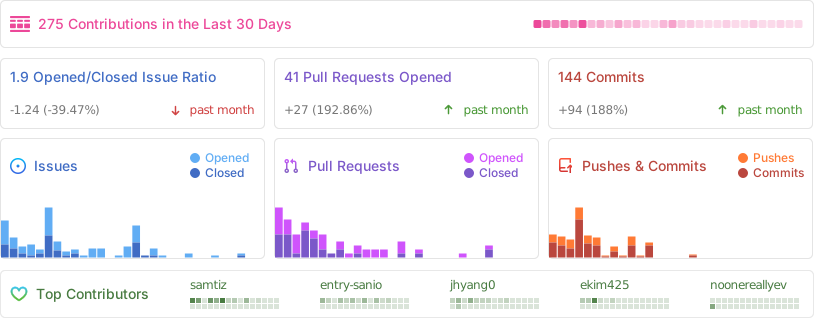
We love contributions! Feel free to open issues for bugs or feature requests. For detailed guide, please see our contributing guide.
Currently, we're working on a full code refactor and modularization. Once that's completed, we'll jump into addressing the major issues.
We have a list of help wanted that contain small features and bugs which have a relatively limited scope. This is a great place to get started, gain experience, and get familiar with our contribution process.
| Status | Issue | Description |
|---|---|---|
| 🚧 WIP | Liquid Glass | Liquid Glass UI for MacOS 26 |
- Jul 5: Now support Gemini, Intel Mac supported
- Jul 6: Full code refactoring has done.
- Jul 7: Now support Claude, LLM/STT model selection
- Jul 8: Now support Windows(beta), Improved AEC by Rust(to seperate mic/system audio), shortcut editing(beta)
- Jul 8: Now support Local LLM & STT, Firebase Data Storage
Our mission is to build a living digital clone for everyone. Glass is part of Step 1—a trusted pipeline that transforms your daily data into a scalable clone. Visit pickle.com to learn more.