Repository navigation
Feature request: Folder names in the replace file dialog #2491
Description

I would love if the folder names where shown in the replace-file-dialog in nemo. This can be helpful when you are moving hundreds of files and sub-folders, into another folder.
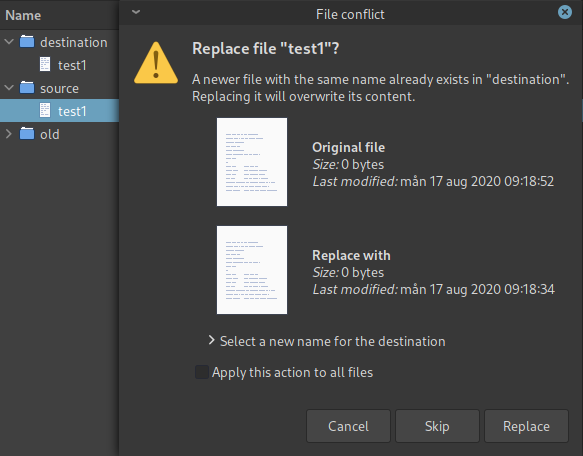
There seems to be a lot of space under the Original file and Replace with headers, where the folder names could fit.
In this extremely simple example I dragged the file source/file1 to the destination folder (ignore the old folder), and nowhere can you see that it is the file source/test1 that is about to replace the destination/test1. In this simple example you would know that, but in a real world scenario, where you are moving folders, sub-folders and files, it often can be useful to see the folder names:
Another idea would be a link or button, where you could open the destination and/or the source folder in a new nemo instance, maybe using the F3 feature and showing the folders side by side.
Activity
github-actions commentedon Mar 2, 2026
This issue has been automatically marked as stale because it has not had
any activity in over 2 years.
If this issue is still relevant:
If no activity occurs in the next 30 days, this issue will be
automatically closed. Issues can be reopened if needed.
Hultan commentedon Mar 2, 2026
This issue still exists today 5 years later, in version 6.6.3 of Nemo. I still think that it is kind of important to know exactly which file replaces which file. And it should not be a complicated issue to solve...just adding two labels and fill them with the paths...
JosephMcc commentedon Mar 3, 2026
There are currently no plans to implement this and feature requests now go here: https://github.com/orgs/linuxmint/discussions