Repository navigation
Permissions clarification #2206
Description

 * Nemo version 4.2.3
 * Is issue with desktop or windowed nemo? windowed
 * Distribution - Mint 19.2
 * Graphics hardware *and* driver used: Intel
 * 64 bit
File permissions for "Others" not identified
Open Nemo
Right Click on any file, such as a jpeg for example
Select "Properties"
Select the "Permissions" tab
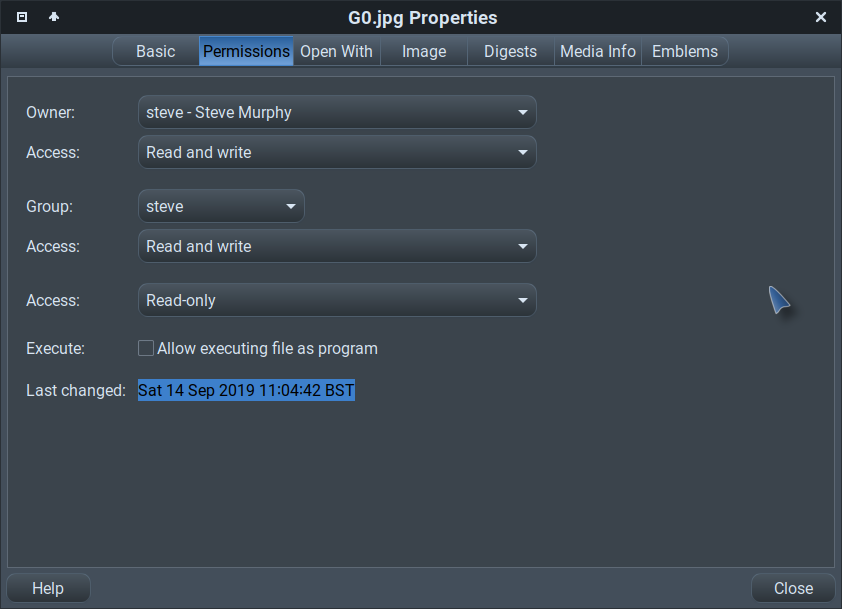
Nemo displays the "Owner" and their access level, the Group and their access level, followed by another Access level which is not identified. This second access level should be identified as "Others"
Two Access levels are shown under "Group". One should be identified as Group and the other should be identified as "Others"
Clarification only. Not a bug.
Activity
smurphos commentedon Sep 17, 2019
Can you screenshot what you are seeing....Others is present and correct here...
Or are you seeing this - I only get this format running Nemo with elevated privileges
jbergengh commentedon Sep 17, 2019
Please see my screenshot below. I added "Others" in red where I think it should be.
smurphos commentedon Sep 18, 2019
Yep your right that GUI should be fixed. BTW - thie first GUI in my post is the Advanced Permissions view. It can be enabled via Nemo preferences.
github-actions commentedon Mar 2, 2026
This issue has been automatically marked as stale because it has not had
any activity in over 2 years.
If this issue is still relevant:
If no activity occurs in the next 30 days, this issue will be
automatically closed. Issues can be reopened if needed.
jbergengh commentedon Mar 2, 2026
It's been over 6 years and this trivial correction hasn't been made. It still exists in Nemo 6.6.3