


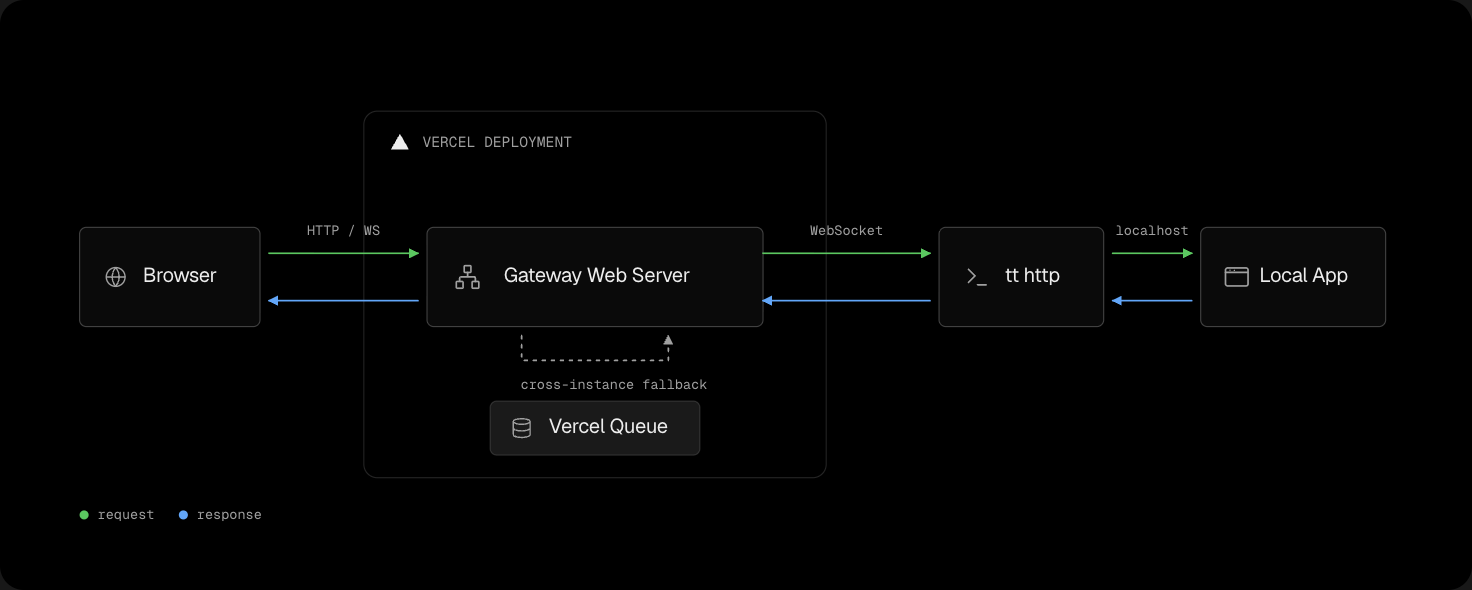
Turbotunnel gives a local HTTP or WebSocket app a public URL through a gateway deployed to your Vercel account.
Install Turbotunnel and the Vercel CLI, then authenticate:
npm i -g turbotunnel vercel
vercel login
Deploy your gateway once, start your local app, and open a tunnel to its port:
tt deploy
tt http 5173
tt http prints the public URL and forwards traffic until you press Ctrl-C. See the get started guide for the complete setup flow.
- A browser sends an HTTP or WebSocket request to your Vercel gateway.
- The gateway forwards the request through a persistent relay WebSocket to
tt. ttsends the request to your local app and returns its response.
The relay uses a configurable pool of 1 to 16 sockets and defaults to 2. If a Vercel instance has no eligible relay connection, Vercel Queue forwards the request to an instance connected to your machine.
Read how Turbotunnel works for gateway status, presence, and retry behavior.
| Surface | Limit |
|---|---|
| Tunnel availability | While tt http or tt dev runs |
| HTTP request duration | 30s |
| Request body | 4 MiB (4,194,304 bytes) |
| Response body | 4 MiB (4,194,304 bytes) |
| Direct HTTP capacity | 32 in-flight requests per relay socket |
| Public WebSockets | 32 per slug per gateway instance |
| Relay pool | 1 to 16 sockets; default 2 |
See Turbotunnel limits for scopes and HTTP or WebSocket failure behavior.
- Browse use cases
- Deploy a gateway and configure domains
- Expose an already-running app with
tt http - Run a development server with
tt dev - Inspect local tunnels with
tt status - List gateway-reported tunnels with
tt list - Configure runtime overrides
- Troubleshoot failures
The repository requires Bun 1.3.14 or newer and Node.js 22 or newer:
bun install
bun run tt -- http 5173MIT