
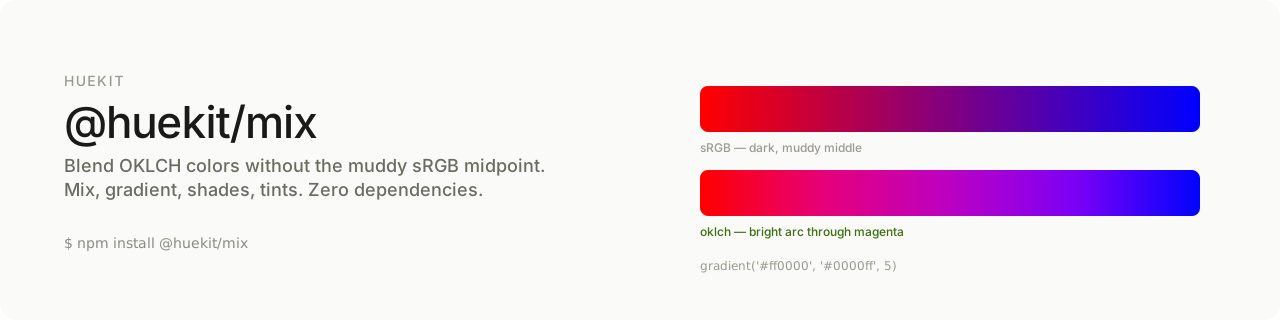
Blend OKLCH colors without the muddy sRGB midpoint. Zero dependencies. Part of huekit, the OKLCH toolkit for designers.
import { mix, gradient, shades, tints } from '@huekit/mix'

mix('#ff0000', '#0000ff')          // → 'oklch(0.54 0.29 326.64)'
gradient('#ff0000', '#0000ff', 5)  // → ['oklch(...)', ...]  arcs through magenta
shades('#3b82f6', 4)               // → 4 darker blues
tints('#3b82f6', 4) // → 4 lighter bluesBlend two colors in plain RGB and the midpoint dives through grey. Red to blue becomes a dull purple-brown in the middle, because a straight line between two points in RGB space cuts through the desaturated centre.
OKLCH interpolates around the hue wheel instead, so blends stay vivid the whole way across — red to blue arcs up through magenta, the way you'd expect mixing light to behave. Same reason OKLCH gradients look better in CSS: no dead zone in the middle.
@huekit/mix gives you that for blending, gradients, and quick shade/tint ramps.
npm install @huekit/mixAll functions accept hex strings or { l, c, h } objects, and return oklch() strings by default. Pass { raw: true } for { l, c, h } objects, and { precision: n } to control decimals.
Blend two colors. ratio 0 = all a, 1 = all b, 0.5 = midpoint (default).
mix('#ff0000', '#0000ff')            // → midpoint
mix('#ff0000', '#0000ff', 0.25)      // → closer to red
mix('#f00', '#00f', 0.5, { raw: true }) // → { l, c, h }
Hue is interpolated the short way around the wheel. If one color is achromatic (grey/black/white), the other's hue is held so no spurious tint creeps in.
An evenly-spaced array of stops between two colors. steps is the total count (minimum 2, default 5). First and last stops are the endpoints.
gradient('#ff0000', '#0000ff', 5)
// → ['oklch(0.63 0.26 29)', ..., 'oklch(0.45 0.31 264)']n progressively darker steps (mixes toward black). Does not include the original.
shades('#3b82f6', 4) // → 4 increasingly dark bluesn progressively lighter steps (mixes toward white). Does not include the original.
tints('#3b82f6', 4) // → 4 increasingly light bluesconst stops = gradient('#ff0000', '#0000ff', 7)
const css = `background: linear-gradient(90deg, ${stops.join(', ')});`| Package | What it does |
|---|---|
@huekit/hex |
hex → oklch() conversion |
@huekit/scale |
perceptual lightness scale from one color |
@huekit/contrast |
WCAG & APCA contrast + readability helpers |
@huekit/mix ← you are here |
blend colors, no muddy midpoint |
@huekit/tailwind |
brand hex → Tailwind v4 @theme block (soon) |
@huekit/tokens |
design tokens → CSS custom properties (soon) |
MIT