





Caution
🚨 Free and Open-Source Android is under threat!
Google will turn Android into a locked-down platform, restricting your essential freedom to install apps of your choice. Make your voice heard – Keep Android Open.
NOAA Weather Android Application with Widget.
Add multiple stations via search or GPS location. Select primary station to show on widget and startup. Custom update interval and notification settings and more...

📲 Click to View QR Codes 📸 Supports Android 8 (API 26) 2017 +


Note: If installing directly, you may need to allow installation of apps from unknown sources.
For more information, see Release through a website.
View Manual Steps to Install from Unknown Sources
Note: Downloading and Installing the apk should take you to the settings area to allow installation if not already enabled. Otherwise:
- Go to your device settings.
- Search for "Install unknown apps" or similar.
- Choose the app you will install the apk file from.
- Select your web browser to install directly from it.
- Select your file manager to open it, locate the apk and install from there.
- Download the Latest Release.
- Open the download apk in the app you selected in step #3.
- Choose Install and Accept any Play Protect notifications.
- The app is now installed. Proceed to the Setup section below.
The GitHub APK has been registered with Google's Android developer verification.
83:B6:40:9F:E6:AF:2B:D1:DD:4E:FC:5F:70:71:A5:A2:E2:A2:44:84:05:07:B1:FF:3C:D5:48:9B:F1:89:BC:22
How to Verify an APK Signature
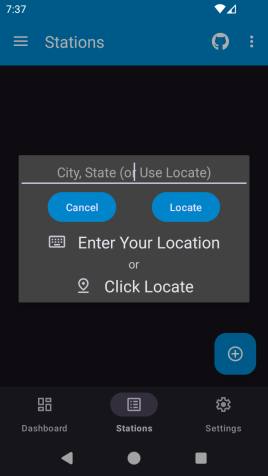
- Install and open the app on your device.
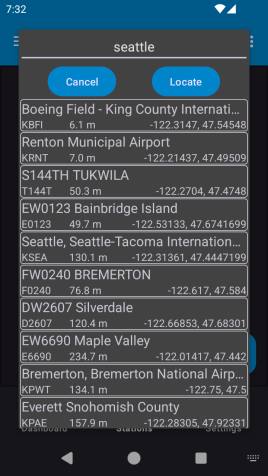
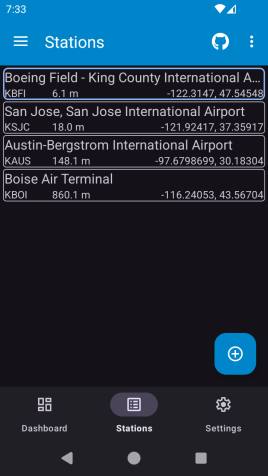
- Go to the Stations page and click the Add button.
- Click Locate, allow permissions, select a station.
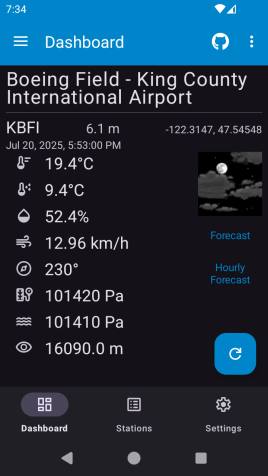
- You can also add the widget to your home screen.
- Add Multiple NOAA Stations with Search or GPS
- Widget with Current Conditions from Selected Station
- Custom Widget Update Interval and Temperature Unit
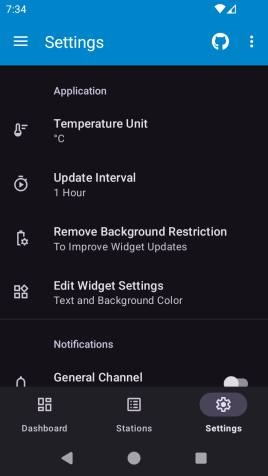
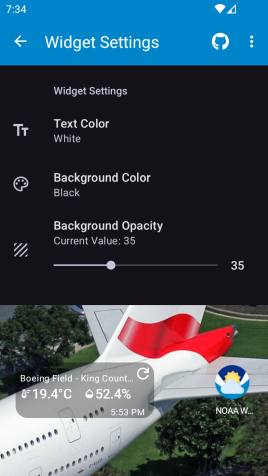
For general help or to request a feature, see:
- Q&A Discussion: https://github.com/cssnr/noaa-weather-android/discussions/categories/q-a
- Request a Feature: https://github.com/cssnr/noaa-weather-android/discussions/categories/feature-requests
If you are experiencing an issue/bug or getting unexpected results, you can:
- Report an Issue: https://github.com/cssnr/noaa-weather-android/issues
- Chat with us on Discord: https://discord.gg/wXy6m2X8wY
- Provide General Feedback: https://cssnr.github.io/feedback/
Without crash reporting, fixing a bug requires you to:
- Stop what you're doing and open a browser
- Go to the GitHub repo and create an Issue
- Explain exactly what you were doing when the app crashed
- Hope I can re-create the bug myself to get the stack trace
That's a heavy ask for an app that's already broken — it leaves you with a bad experience and me without enough data to fix it.
To close that gap without compromising your data or privacy, this app uses ACRA — an open-source crash reporting library. Reports are received by a self-hosted Acrarium backend that runs on my own infrastructure, so crash data doesn't go to any third parties — no Google or other big-data services.
You can turn crash reporting on or off at any time with a toggle on the Settings page.
ACRA only sends reports when the app hits an unhandled crash. By default, it only sends the technical context needed to diagnose the crash:
- The stack trace of the crash, plus the app and Android versions
- Basic device context — e.g. the device model and OS version
- A short extract of the app's own logcat (the last ~200 lines)
It does not track usage or activity, collect a device identifier, or send system or other apps' logs. Each report is anonymized and sent directly to my server, so only I receive the data.
This section briefly covers running and building in Android Studio and the Command Line.
- Download and Install Android Studio.
https://developer.android.com/studio
-
Ensure that usb or wifi debugging is enabled in the Android developer settings and verify.
-
Then build or run the app on your device.
- Import the Project
- Run Gradle Sync
To Run: Select a device and press Play
To Build:
- Select the Build Variant (debug or release)
- Build > Generate App Bundles or APK > Generate APKs
Warning
This section may not be complete! For more details see the release.yaml.
You will need to have ADB installed.
- Download and Install the Android SDK Platform Tools.
https://developer.android.com/tools/releases/platform-tools#downloads
Ensure that adb is in your PATH.
- List and verify the device is connected with:
$ adb devices
List of devices attached
RF9M33Z1Q0M device- Build a debug or release apk.
./gradlew assemble
./gradlew assembleRelease
Note: Use gradlew.bat for Windows.
- Then install the apk to your device with adb.
$ cd app/build/outputs/apk/debug
$ adb -s RF9M33Z1Q0M install app-debug.apk
$ cd app/build/outputs/apk/release
$ adb -s RF9M33Z1Q0M install app-release-unsigned.apkNote: you may have to uninstall before installing due to different certificate signatures.
For more details, see the ADB Documentation.
If you would like to submit a PR, please review the CONTRIBUTING.md.
Please consider making a donation to support the development of this project and additional open source projects.

You can also star this project on GitHub and support other related projects:
- Django Files Android
- Zipline Android
- NOAA Weather Android
- Remote Wallpaper Android
- Tibs3DPrints Android
For a full list of current projects visit: https://cssnr.github.io/