The select dropdown, reimagined.
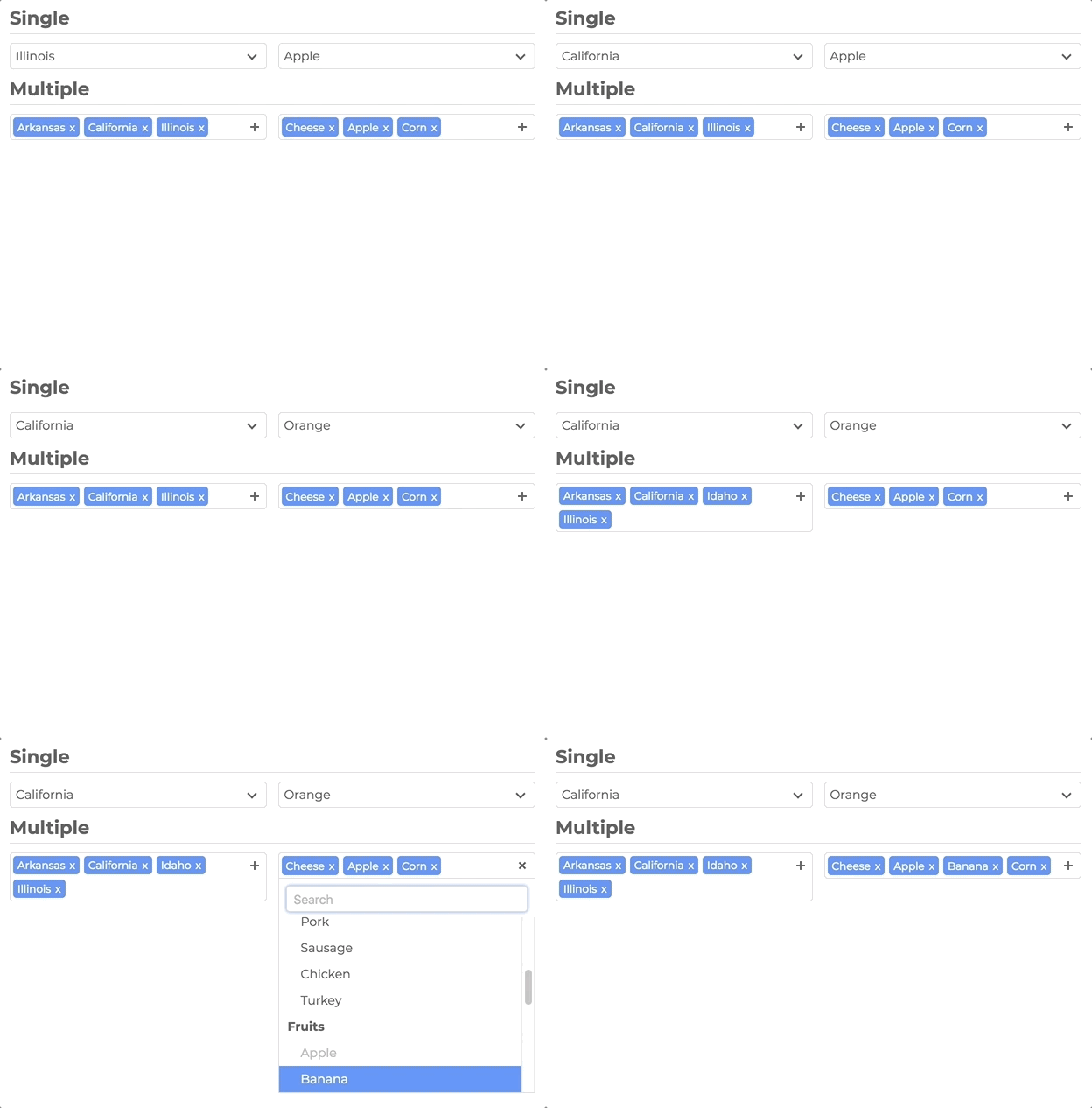
A lightweight, dependency-free replacement for the native <select> — single and multi-select, search, optgroups,
remote data, modal mode on mobile, and full theming through CSS variables. Drop it into any stack, or use the official
Vue and React wrappers.



Full docs, live demos, and copy-paste examples: slimselectjs.com
Select, upgraded
- Single and multi-select with tags, placeholders, and deselect
- Search with highlighting, remote/API search, and user-addable options
- Optgroups with select-all and closable accordion groups
- HTML options, tooltips, min/max selection limits, and disabled options
- Modal mode (
off|on|mobile) — centered panel with backdrop; mobile-friendly by default
Looks like your product
- Theme entirely with
--ss-*CSS custom properties — no fighting class specificity - Import plain CSS or SCSS; inherit styles and classes from the native
<select>
Built to ship
- Zero runtime dependencies
- ~66KB JS (~16KB gzip) · ~12KB CSS (~2KB gzip)
- TypeScript types included
- WCAG 2.1 Level AA accessibility (ARIA, keyboard, screen reader support)
prefers-reduced-motionrespected- 477 unit tests + 46 Playwright E2E tests
Framework ready
npm install slim-select<script src="https://unpkg.com/slim-select@latest/dist/slimselect.js"></script>
<link rel="stylesheet" href="https://unpkg.com/slim-select@latest/dist/slimselect.css" />import SlimSelect from 'slim-select'
import 'slim-select/styles' // or: import 'slim-select/scss'
new SlimSelect({
select: '#selectElement'
})<select id="selectElement">
<option value="value1">Value 1</option>
</select>Slim Select is styled with CSS variables. Set them on a wrapper around your select (or on :root for a global theme):
.my-form {
  --ss-primary-color: #2563eb;
  --ss-bg-color: #ffffff;
  --ss-font-color: #1e293b;
  --ss-border-color: #e2e8f0;
  --ss-border-radius: 8px;
  --ss-main-height: 44px;
}
See the full token list and live themes on the Style docs.
Pass an array of options and optgroups instead of (or in addition to) native <option> elements:
new SlimSelect({
  select: '#selectElement',

  data: [
    { text: 'Value 1', value: 'value1' },
    {
      label: 'Group label',
      options: [
        { text: 'Value 2', value: 'value2' },
        { text: 'Value 3', value: 'value3' }
      ]
    }
  ]
})// <optgroup>
const optgroup = {
label: 'label', // Required
selectAll: false, // Optional — default false
closable: 'off', // Optional — 'off' | 'open' | 'close'
options: [] // Required — array of options
}
// <option>
const option = {
text: 'text', // Required
value: 'value', // Optional — defaults to text
html: '<b>Html</b>', // Optional — used for display when set
selected: false,
display: true,
disabled: false,
mandatory: false,
placeholder: false,
class: '',
style: '',
data: {} // Plain object for data-* attributes
}All fields are optional. Values shown are defaults.
new SlimSelect({
  select: '#selectElement',

  settings: {
    disabled: false,
    alwaysOpen: false,
    showSearch: true,
    focusSearch: true,
    keepSearch: false,
    ariaLabel: 'Combobox',
    searchPlaceholder: 'Search...',
    searchText: 'No Results',
    searchingText: 'Searching...',
    resultsText: '{count} results available',
    deselectText: 'Clear',
    removeText: 'Remove',
    searchHighlight: false,
    closeOnSelect: true,
    contentLocation: document.body,
    contentPosition: 'absolute', // 'absolute' | 'relative' | 'fixed'
    contentWidth: '', // e.g. '500px', '>500px', '<500px'
    openPosition: 'auto', // 'auto' | 'up' | 'down'
    placeholderText: 'Select Value',
    allowDeselect: false,
    hideSelected: false,
    multiString: false,
    keepOrder: false,
    showOptionTooltips: false,
    minSelected: 0,
    maxSelected: 1000,
    timeoutDelay: 200,
    maxValuesShown: 20,
    maxValuesMessage: '{number} selected',
    addableText: 'Press "Enter" to add {value}',
    modal: 'mobile', // 'off' | 'on' | 'mobile'
    modalTitle: '' // Header above the option list in modal view
  }
})new SlimSelect({
select: '#selectElement',
events: {
// Remote/API search — return a Promise or data array
// searchValue: current input text
// selected: currently selected Option[]
// catalog: baseline list restored when search clears
search: (
searchValue: string,
selected: Option[],
catalog?: (Option | Optgroup)[]
) =>
Promise<(Partial<Option> | Partial<Optgroup>)[]> |
(Partial<Option> | Partial<Optgroup>)[],
// Local filter when events.search is not set
searchFilter: (option: Option, search: string) => boolean,
// User-added options — return the new option or an Error
addable: (value: string) => Promise<Partial<Option> | string> | Partial<Option> | string | Error,
beforeChange: (newVal: Option[], oldVal: Option[]) => boolean | void,
afterChange: (newVal: Option[]) => void,
beforeOpen: () => void,
afterOpen: () => void,
beforeClose: () => void,
afterClose: () => void,
error: (err: Error) => void
}
})const slim = new SlimSelect({ select: '#selectElement' })
slim.enable()
slim.disable()
slim.getData()
slim.setData(data)
slim.getSelected() // string[]
slim.setSelected(['value1', 'value2'])
slim.addOption(option)
slim.open()
slim.close()
slim.search('searchValue')
slim.destroy()Official Vue 3 component with v-model and full TypeScript support.
npm install slim-select<script lang="ts">
import SlimSelect from 'slim-select/vue'
import 'slim-select/styles'
export default {
components: { SlimSelect },
data() {
return {
selected: 'value2',
options: [
{ text: 'Value 1', value: 'value1' },
{ text: 'Value 2', value: 'value2' },
{ text: 'Value 3', value: 'value3' }
]
}
}
}
</script>
<template>
<SlimSelect v-model="selected" :data="options" />
</template>Note: Pass options via the
:dataprop. Native<option>slot children are not supported in the Vue wrapper.
Official React component with hooks and ref access to the underlying instance.
npm install slim-selectimport { useState } from 'react'
import SlimSelect from 'slim-select/react'
import 'slim-select/styles'
function MyComponent() {
const [selected, setSelected] = useState('value2')
const options = [
{ text: 'Value 1', value: 'value1' },
{ text: 'Value 2', value: 'value2' },
{ text: 'Value 3', value: 'value3' }
]
return <SlimSelect data={options} value={selected} onChange={setSelected} />
}Note: Pass options via the
dataprop. Native<option>children are not supported in the React wrapper.
import { useRef } from 'react'
import SlimSelect, { SlimSelectRef } from 'slim-select/react'
import 'slim-select/styles'

function MyComponent() {
  const slimRef = useRef<SlimSelectRef>(null)

  return (
    <>
      <SlimSelect ref={slimRef} data={options} />
      <button onClick={() => slimRef.current?.slimSelect?.open()}>Open</button>
    </>
  )
}




