Table of Contents
npm install json-asAdd the --transform to your asc command (e.g. in package.json)
--transform json-asOptionally, for additional performance, also add:
--enable simdAlternatively, add it to your asconfig.json
{
  "options": {
    "transform": ["json-as"]
  }
}
If you'd like to see the code that the transform generates, run the build step with DEBUG=true
Full documentation lives at:
https://docs.jairus.dev/json-as
import { JSON } from "json-as";

@json
class Vec3 {
  x: f32 = 0.0;
  y: f32 = 0.0;
  z: f32 = 0.0;
}

@json
class Player {
  @alias("first name")
  firstName!: string;
  lastName!: string;
  lastActive!: i32[];
  // Drop in a code block, function, or expression that evaluates to a boolean
  @omitif((self: Player) => self.age < 18)
  age!: i32;
  @omitnull()
  pos!: Vec3 | null;
  isVerified!: boolean;
}

const player: Player = {
  firstName: "Jairus",
  lastName: "Tanaka",
  lastActive: [3, 9, 2025],
  age: 18,
  pos: {
    x: 3.4,
    y: 1.2,
    z: 8.3,
  },
  isVerified: true,
};

const serialized = JSON.stringify<Player>(player);
const deserialized = JSON.parse<Player>(serialized);

console.log("Serialized    " + serialized);
console.log("Deserialized " + JSON.stringify(deserialized));This library allows selective omission of fields during serialization using the following decorators:
@omit
This decorator excludes a field from serialization entirely.
@json
class Example {
  name!: string;
  @omit
  SSN!: string;
}

const obj = new Example();
obj.name = "Jairus";
obj.SSN = "123-45-6789";

console.log(JSON.stringify(obj)); // { "name": "Jairus" }
@omitnull
This decorator omits a field only if its value is null.
@json
class Example {
  name!: string;
  @omitnull()
  optionalField!: string | null;
}

const obj = new Example();
obj.name = "Jairus";
obj.optionalField = null;

console.log(JSON.stringify(obj)); // { "name": "Jairus" }
@omitif((self: this) => condition)
This decorator omits a field based on a custom predicate function.
@json
class Example {
  name!: string;
  @omitif((self: Example) => self.age <= 18)
  age!: number;
}

const obj = new Example();
obj.name = "Jairus";
obj.age = 18;

console.log(JSON.stringify(obj)); // { "name": "Jairus" }

obj.age = 99;

console.log(JSON.stringify(obj)); // { "name": "Jairus", "age": 99 }
If age were higher than 18, it would be included in the serialization.
@optional
This decorator marks a field as optional for deserialization: the key may be absent from (or appear in any order in) the input, and the field keeps its default. Unlike @omitnull and @omitif, it does not affect serialization - the field is always emitted - and it has no nullability requirement. It only opts the field into the order-tolerant fast path on parse.
@json
class Tweet {
  text!: string;
  @optional
  retweeted_status: Retweet | null = null; // key may be absent
}

const tweet = JSON.parse<Tweet>('{ "text": "hello" }');
console.log(tweet.retweeted_status); // null (key was absent)AssemblyScript doesn't support using nullable primitive types, so instead, json-as offers the JSON.Box class to remedy it.
For example, this schema won't compile in AssemblyScript:
@json
class Person {
  name!: string;
  age: i32 | null = null;
}
Instead, use JSON.Box to allow nullable primitives:
@json
class Person {
  name: string;
  age: JSON.Box<i32> | null = null;
  constructor(name: string) {
    this.name = name;
  }
}

const person = new Person("Jairus");
console.log(JSON.stringify(person)); // {"name":"Jairus","age":null}

person.age = new JSON.Box<i32>(18); // Set age to 18
console.log(JSON.stringify(person)); // {"name":"Jairus","age":18}Sometimes it's necessary to work with unknown data or data with dynamic types.
Because AssemblyScript is a statically-typed language, that typically isn't allowed, so json-as provides the JSON.Value and JSON.Obj types.
Here's a few examples:
Working with multi-type arrays
When dealing with arrays that have multiple types within them, eg. ["string",true,["array"]], use JSON.Value[]
const a = JSON.parse<JSON.Value[]>('["string",true,["array"]]');
console.log(JSON.stringify(a[0])); // "string"
console.log(JSON.stringify(a[1])); // true
console.log(JSON.stringify(a[2])); // ["array"]
Working with unknown objects
When dealing with an object with an unknown structure, use the JSON.Obj type
const obj = JSON.parse<JSON.Obj>('{"a":3.14,"b":true,"c":[1,2,3],"d":{"x":1,"y":2,"z":3}}');

console.log("Keys: " + obj.keys().join(" ")); // a b c d
console.log(
  "Values: " +
    obj
      .values()
      .map<string>((v) => JSON.stringify(v))
      .join(" "),
); // 3.14 true [1,2,3] {"x":1,"y":2,"z":3}

const y = obj.get("d")!.get<JSON.Obj>().get("y")!;
console.log('o1["d"]["y"] = ' + y.toString()); // o1["d"]["y"] = 2
Working with dynamic types within a schema
More often, objects will be completely statically typed except for one or two values.
In such cases, JSON.Value can be used to handle fields that may hold different types at runtime.
@json
class DynamicObj {
  id: i32 = 0;
  name: string = "";
  data!: JSON.Value; // Can hold any type of value
}

const obj = new DynamicObj();
obj.id = 1;
obj.name = "Example";
obj.data = JSON.parse<JSON.Value>('{"key":"value"}'); // Assigning an object

console.log(JSON.stringify(obj)); // {"id":1,"name":"Example","data":{"key":"value"}}

obj.data = JSON.Value.from<i32>(42); // Changing to an integer
console.log(JSON.stringify(obj)); // {"id":1,"name":"Example","data":42}

obj.data = JSON.Value.from("a string"); // Changing to a string
console.log(JSON.stringify(obj)); // {"id":1,"name":"Example","data":"a string"}
Working with nullable primitives and dynamic data
const box = JSON.Box.from<i32>(123);
const value = JSON.Value.from<JSON.Box<i32> | null>(box);
const reboxed = JSON.Box.fromValue<i32>(value); // Box<i32> | null
console.log(reboxed !== null ? reboxed!.toString() : "null");
// 123

const value = JSON.parse<JSON.Value>("123");
const boxed = JSON.Box.fromValue<i32>(value);
console.log(boxed !== null ? boxed!.toString() : "null");
// 123Sometimes its necessary to simply copy a string instead of serializing it.
For example, the following data would typically be serialized as:
const map = new Map<string, string>();
map.set("pos", '{"x":1.0,"y":2.0,"z":3.0}');

console.log(JSON.stringify(map));
// {"pos":"{\"x\":1.0,\"y\":2.0,\"z\":3.0}"}
// pos's value (Vec3) is contained within a string... ideally, it should be left alone
If, instead, one wanted to insert Raw JSON into an existing schema/data structure, they could make use of the JSON.Raw type to do so:
const map = new Map<string, JSON.Raw>();
map.set("pos", new JSON.Raw('{"x":1.0,"y":2.0,"z":3.0}'));

console.log(JSON.stringify(map));
// {"pos":{"x":1.0,"y":2.0,"z":3.0}}
// Now its properly formatted JSON where pos's value is of type Vec3 not string!By default, enums with values other than i32 arn't supported by AssemblyScript. However, you can use a workaround:
namespace Foo {
  export const bar = "a";
  export const baz = "b";
  export const gob = "c";
}

type Foo = string;

const serialized = JSON.stringify<Foo>(Foo.bar);
// "a"This library supports custom serialization and deserialization methods, which can be defined using the @serializer and @deserializer decorators.
Custom serializers and deserializers must always speak valid JSON. You can optionally provide the JSON value shape they operate on using one of: "any", "string", "number", "object", "array", "boolean", or "null". If omitted, the shape defaults to "any".
Here's an example of creating a custom data type called Point which serializes to a JSON string:
@json
class Point {
  x: f64 = 0.0;
  y: f64 = 0.0;
  constructor(x: f64, y: f64) {
    this.x = x;
    this.y = y;
  }

  @serializer("string")
  serializer(self: Point): string {
    return JSON.stringify(`${self.x},${self.y}`);
  }

  @deserializer("string")
  deserializer(data: string): Point {
    const raw = JSON.parse<string>(data);
    if (!raw.length) throw new Error("Could not deserialize provided data as type Point");

    const c = raw.indexOf(",");
    const x = raw.slice(0, c);
    const y = raw.slice(c + 1);

    return new Point(f64.parse(x), f64.parse(y)); // NEVER use this in deserializers. Always return a new instance
  }
}

const obj = new Point(3.5, -9.2);

const serialized = JSON.stringify<Point>(obj);
const deserialized = JSON.parse<Point>(serialized);

console.log("Serialized    " + serialized);
console.log("Deserialized  " + JSON.stringify(deserialized));
The serializer function converts a Point instance into a valid JSON string value.
The deserializer function parses that JSON string back into a Point instance.
Custom deserializers should always instantiate and return a new object. They should not assume an existing destination instance will be passed in or reused.
These functions are then wrapped before being consumed by the json-as library:
__SERIALIZE_CUSTOM(): void {
  const data = this.serializer(this);
  const dataSize = data.length << 1;
  memory.copy(bs.offset, changetype<usize>(data), dataSize);
  bs.offset += dataSize;
}

_DESERIALIZE_CUSTOM(data: string): Point {
  return this.deserializer(data);
}
This allows custom serialization while maintaining a generic interface for the library to access.
Undecorated subclasses of built-in container types keep the built-in JSON behavior.
This rule applies consistently across:
JSON.stringify(...)JSON.parse<T>(...)JSON.Value.from(...)JSON.internal.stringify(...)JSON.internal.parse(...)
For example:
class MyBytes extends Uint8Array {}still serializes like a normalUint8Arrayclass MyMap extends Map<string, i32> {}still serializes like a normalMap<string, i32>- the same applies to subclassable built-ins such as
Array,Set, and typed arrays
If you decorate that subclass with @json, it is treated as a normal generated class instead of inheriting the built-in container behavior. That means generated __SERIALIZE / __DESERIALIZE logic and custom serializer/deserializer hooks can take over.
If you want a different wire format, decorate the subclass with @json and provide custom @serializer(...) / @deserializer(...) methods:
function hexDigit(value: u8): string {
  return String.fromCharCode(value < 10 ? 48 + value : 87 + value);
}

function parseHexNibble(code: u16): u8 {
  if (code >= 48 && code <= 57) return <u8>(code - 48);
  if (code >= 97 && code <= 102) return <u8>(code - 87);
  return <u8>(code - 55);
}

@json
class HexBytes extends Uint8Array {
  constructor(length: i32 = 0) {
    super(length);
  }

  @serializer("string")
  serializer(self: HexBytes): string {
    let out = "";
    for (let i = 0; i < self.length; i++) {
      const value = unchecked(self[i]);
      out += hexDigit(value >> 4);
      out += hexDigit(value & 0x0f);
    }
    return JSON.stringify(out);
  }

  @deserializer("string")
  deserializer(data: string): HexBytes {
    const raw = JSON.parse<string>(data);
    const out = new HexBytes(raw.length >> 1);

    for (let i = 0, j = 0; i < raw.length; i += 2, j++) {
      const hi = parseHexNibble(<u16>raw.charCodeAt(i));
      const lo = parseHexNibble(<u16>raw.charCodeAt(i + 1));
      unchecked((out[j] = <u8>((hi << 4) | lo)));
    }

    return out;
  }
}

const bytes = new HexBytes(4);
bytes[0] = 10;
bytes[1] = 20;
bytes[2] = 30;
bytes[3] = 40;

JSON.stringify(bytes);      // "\"0a141e28\""
JSON.parse<HexBytes>("\"0a141e28\"");
This same pattern works for subclassable built-ins like Array, Map, Set, and typed arrays.
ArrayBuffer and String are @final in AssemblyScript, so they cannot be subclassed there.
json-as is engineered for multi-GB/s serialization and deserialization. Every @json schema is compiled to specialized WebAssembly at build time, and bytes are scanned by one of three interchangeable backends:
- NAIVE — a portable, branchy scalar scanner. The correctness baseline; needs no special CPU features.
- SWAR — SIMD-Within-A-Register: processes 8 bytes at a time with ordinary 64-bit integer math. The default.
- SIMD — true 128-bit vector scanning. Fastest on large and string-heavy payloads; enable with
--enable simd.
The mode is chosen per build via JSON_MODE (see Performance Tuning). Orthogonal to the scan mode, the generated struct path can be swapped for lazy fields (defer parsing until first access) or the fully dynamic, schema-less JSON.Obj path.
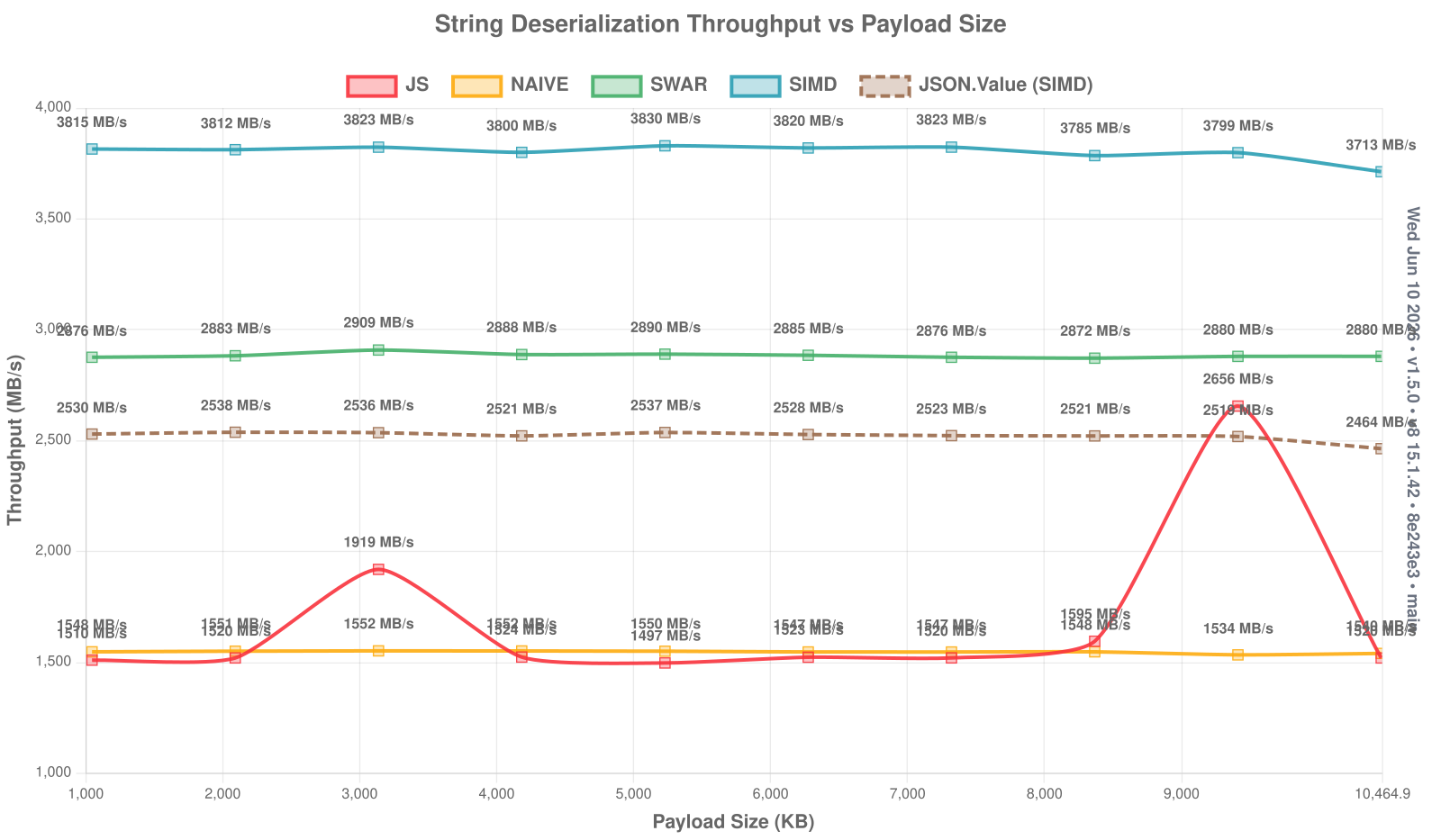
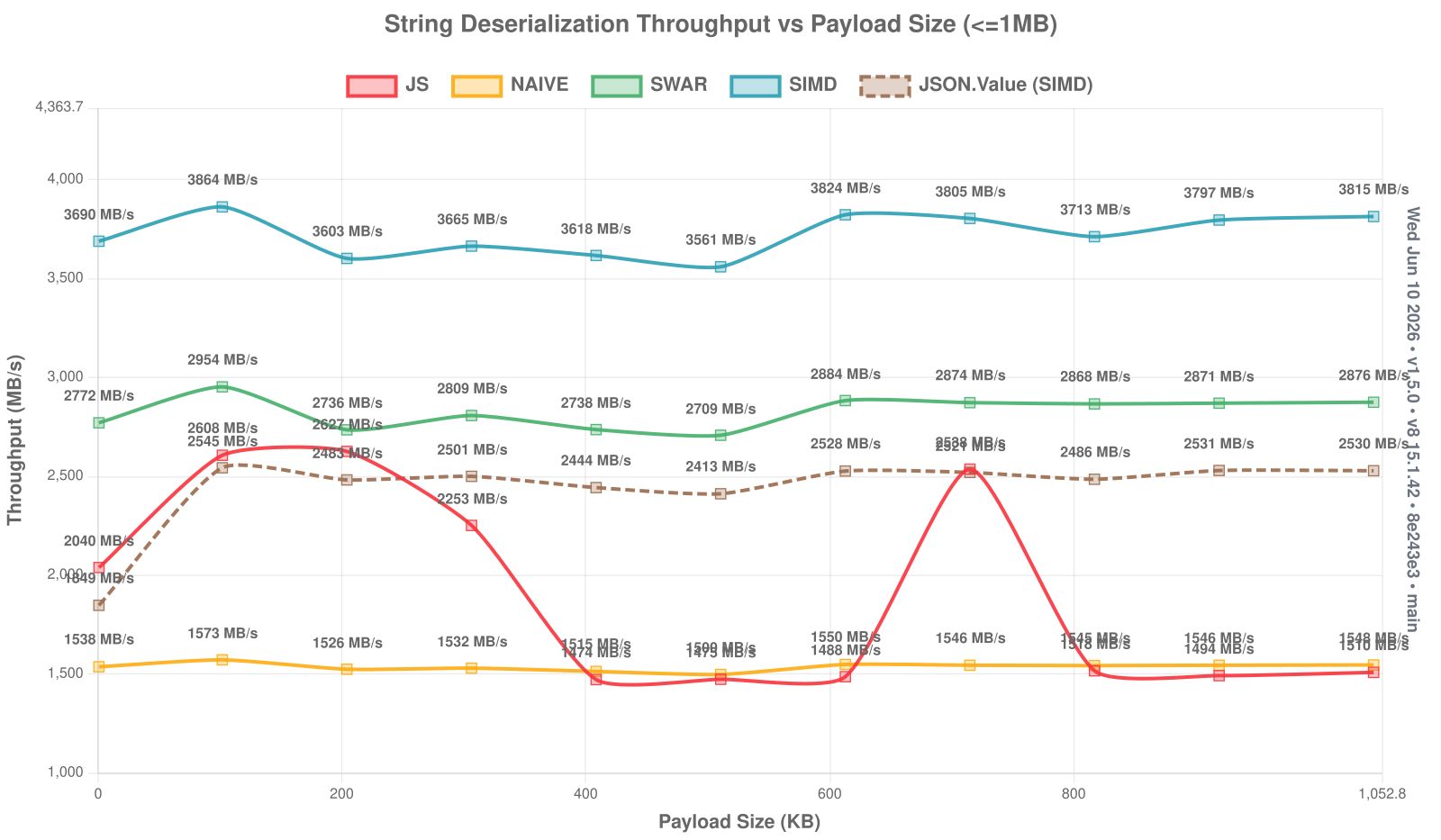
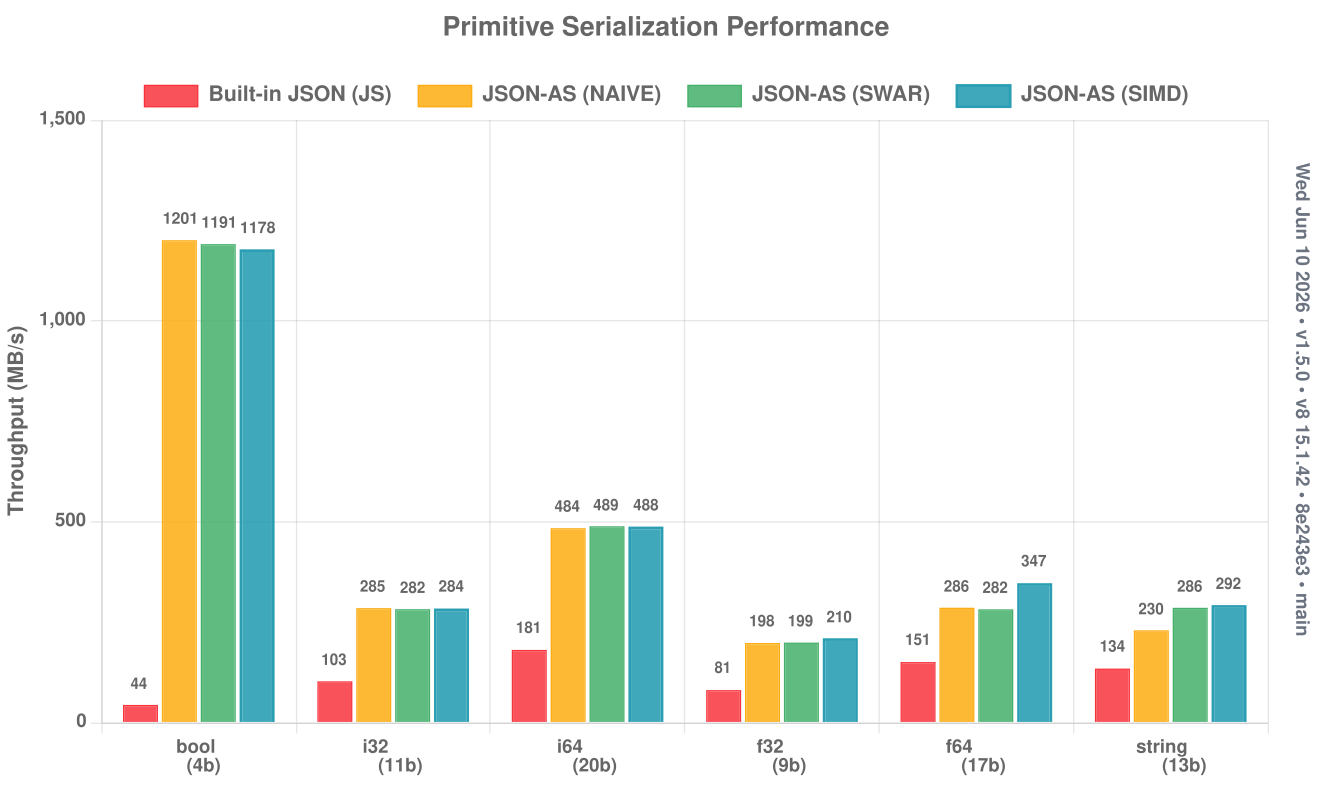
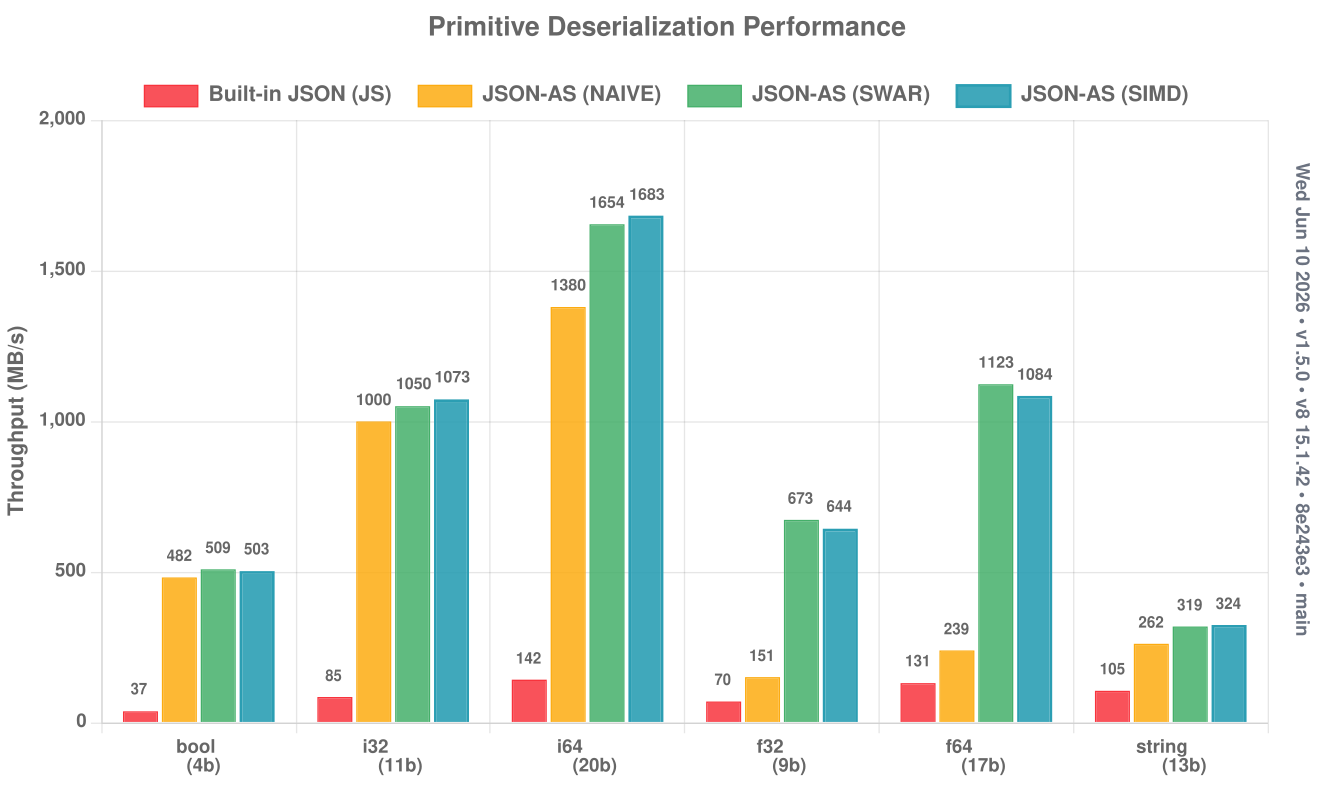
All figures below are end-to-end: deserialization includes allocating the destination object/array, not just scanning bytes — raw parser throughput is higher. Charts are generated locally and pushed to the
docsbranch, and reflect the latest release (older versions may differ).Benchmark machine: AMD Ryzen 7 7800X3D (8 cores, 96 MB 3D V-Cache), 32 GB RAM, Zorin OS 18.1 (Linux 6.17). JavaScript baselines run on V8's turboshaft optimizer.
📊 Browse the full chart set for this release →
The headline benchmark: nine standard JSON payloads — drawn from the yyjson and nativejson-benchmark corpora — measured in all three scan modes, with the SIMD lazy-struct and dynamic JSON.Obj paths shown alongside.
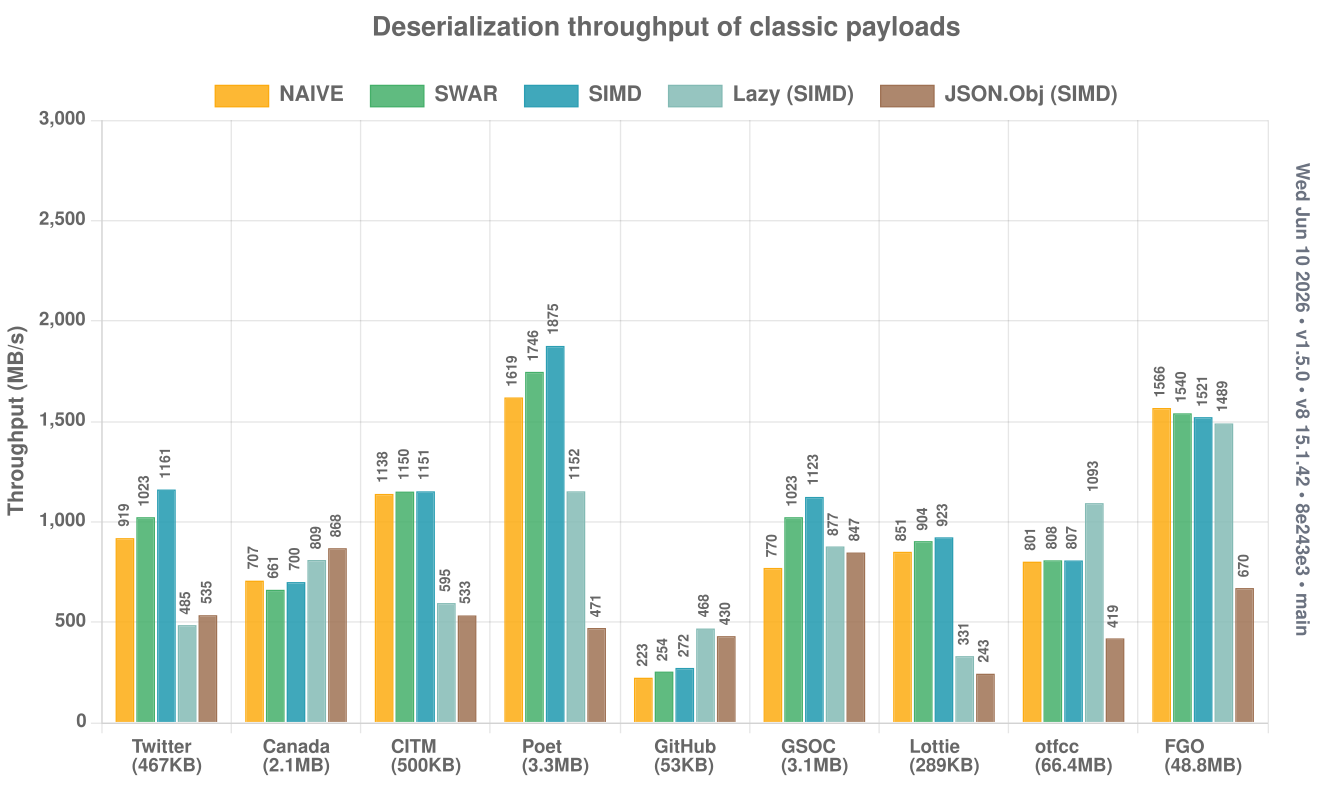
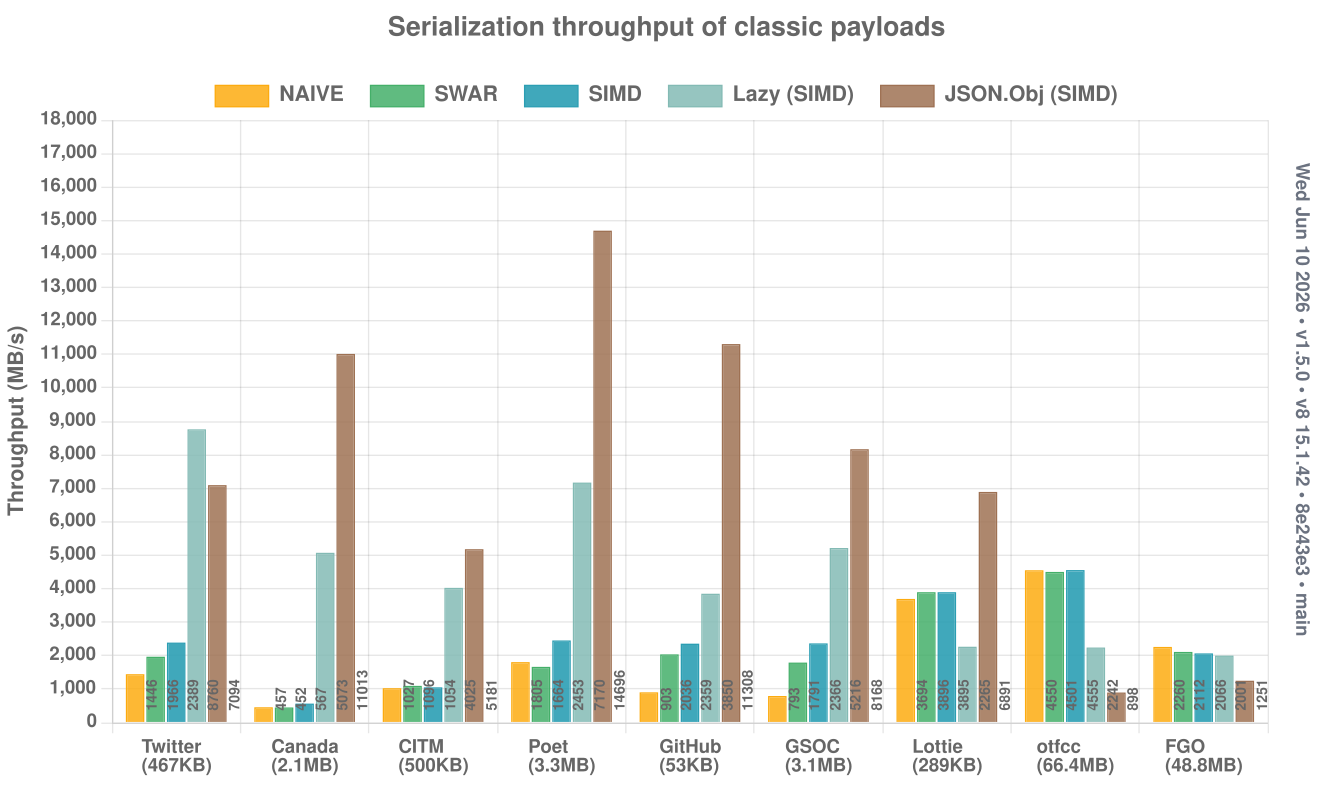
Each payload stresses a different document shape:
| Payload | Size | What it stresses |
|---|---|---|
| 467 KB | API response, fully-modeled struct schema with @optional keys |
|
| Canada | 2.1 MB | GeoJSON — deeply nested arrays of floating-point coordinates |
| CITM | 500 KB | Concert catalog — dynamic-key Maps plus uniform struct arrays |
| Poet | 3.3 MB | ~8,900 flat {desc, name, id} records — pure struct fast path |
| GitHub | 53 KB | 30 GitHub events — a wide union of per-event-type fields |
| GSOC | 3.1 MB | ~1,264 org records keyed by id (schema.org JSON-LD Map) |
| Lottie | 289 KB | Vector-animation doc — structs over deeply variable layer data |
| otfcc | 66.4 MB | OpenType font dump — 15 tables captured as JSON.Raw |
| FGO | 48.8 MB | Game-data dump — 193 irregular tables as Map<string, JSON.Raw> |
The five series in each chart:
- NAIVE / SWAR / SIMD — the generated struct path under each scan backend, parsing every field into a typed schema.
- Lazy (SIMD) —
@json({ lazy: "auto" }): each field's raw slice is stored at parse time and decoded only on first access; on serialize, untouched fields stream their original bytes straight back out. Reading or rewriting a subset is dramatically cheaper — see Lazy Fields. - JSON.Obj (SIMD) — a fully dynamic, schema-less parse into
JSON.Obj, with no generated per-type code.
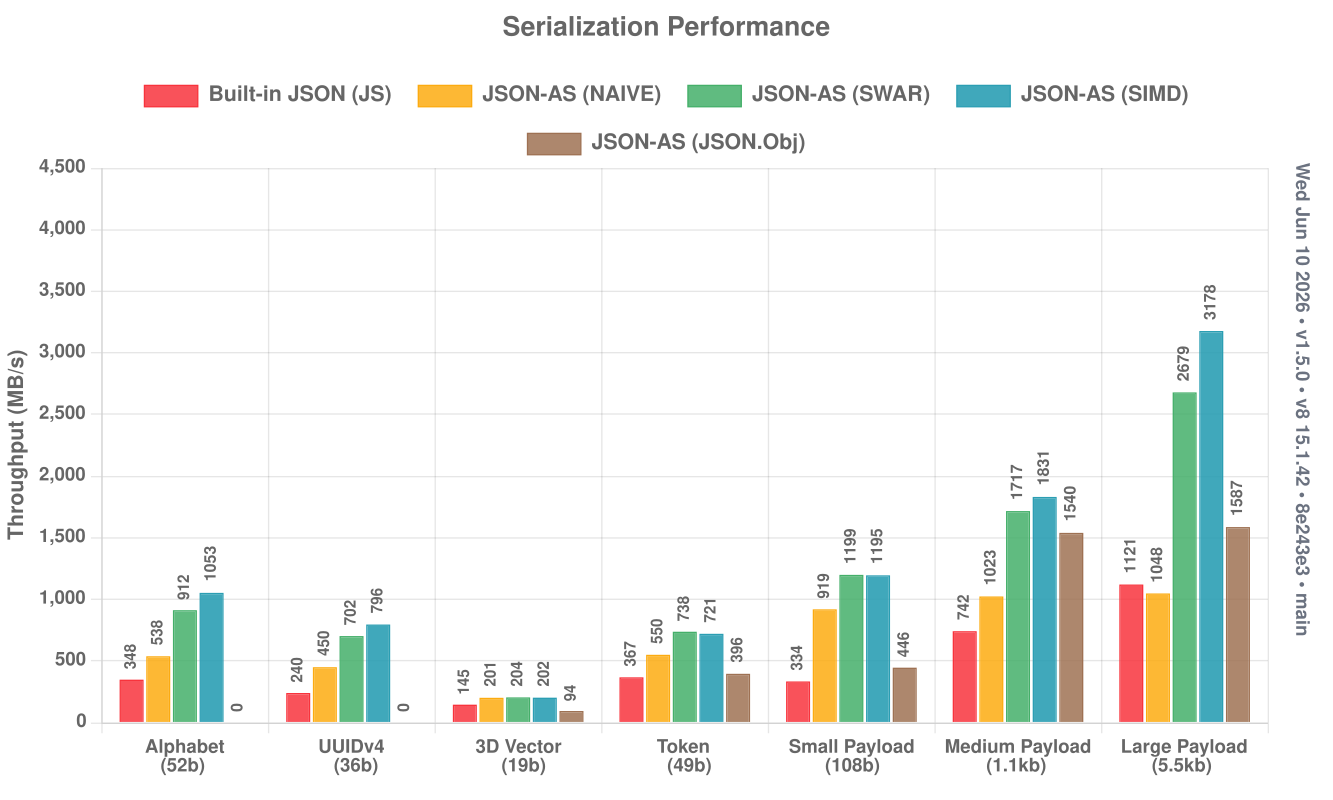
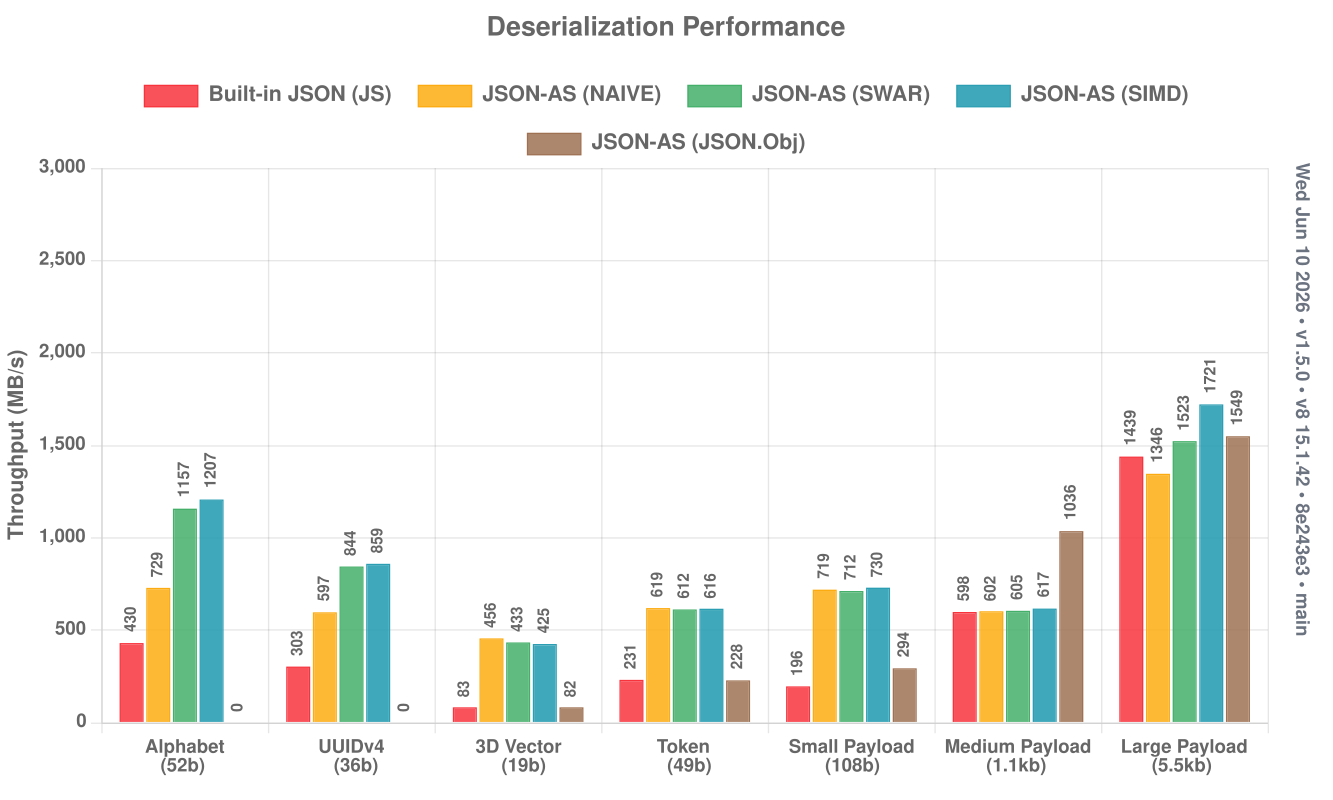
json-as against JavaScript's native JSON, parsed and stringified in a fresh V8 — as close to apples-to-apples as a Wasm-vs-native comparison gets.
String serialize charts (click to expand)
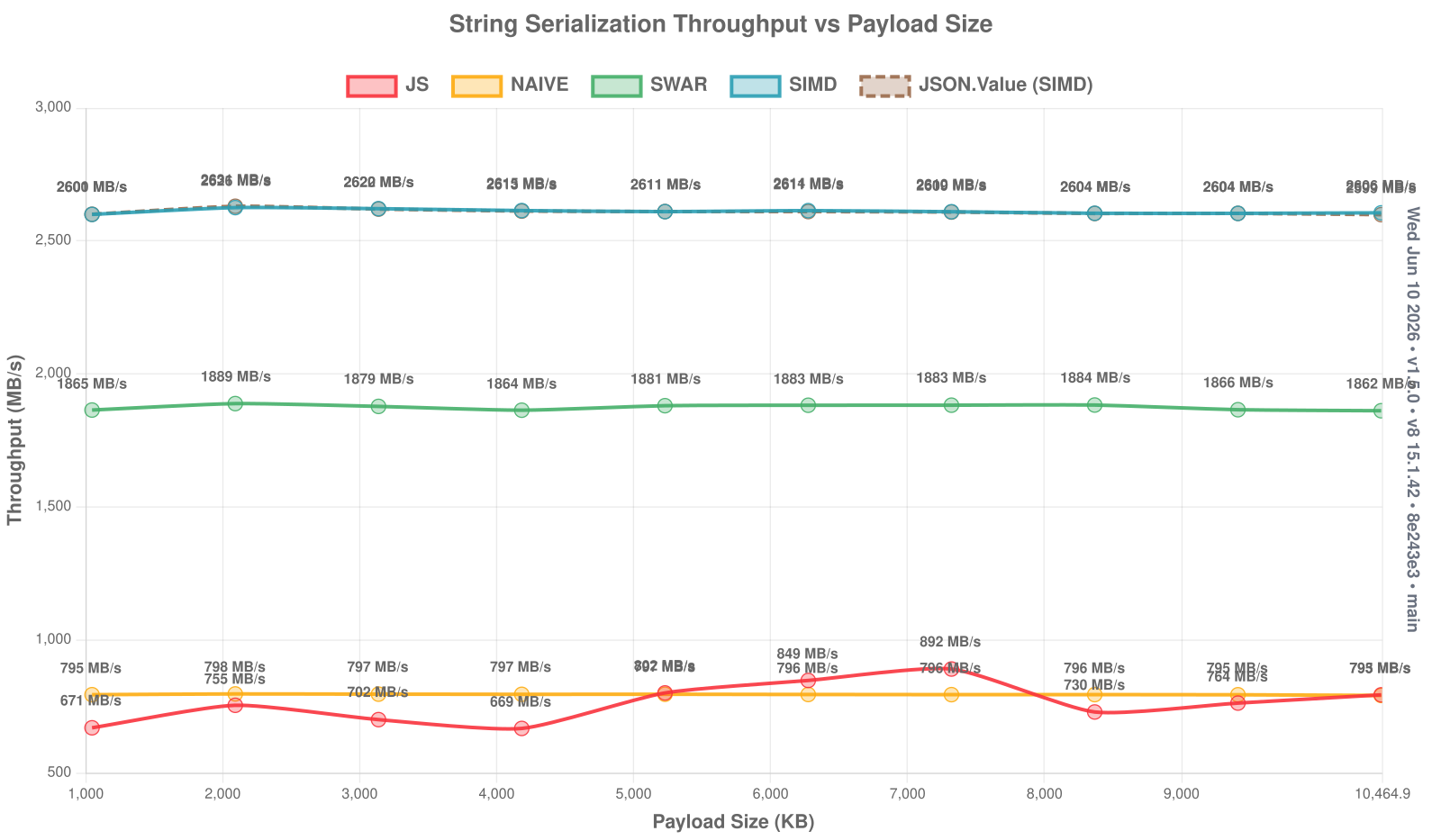
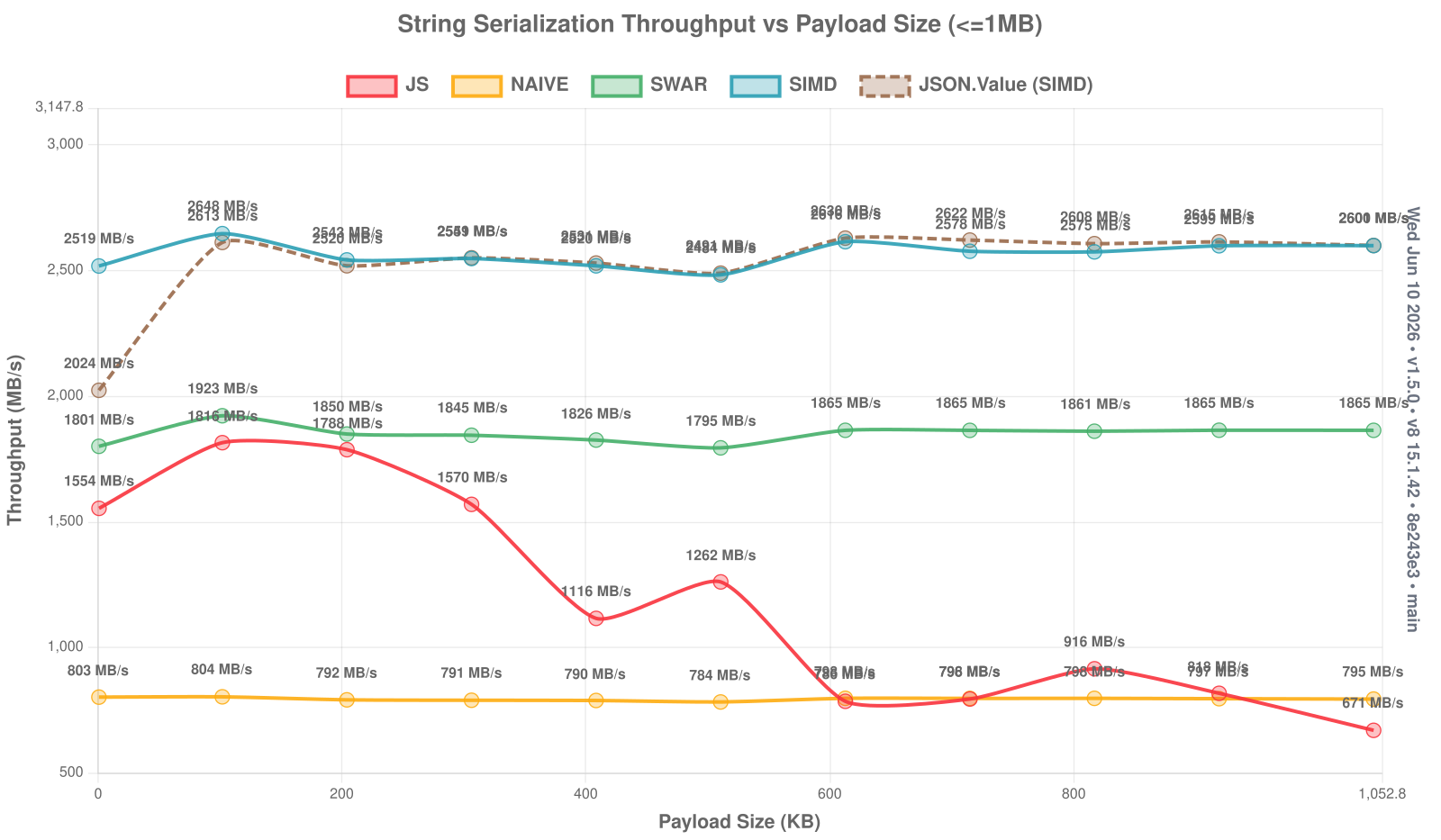
String deserialize charts (click to expand)
Object serialize charts (click to expand)
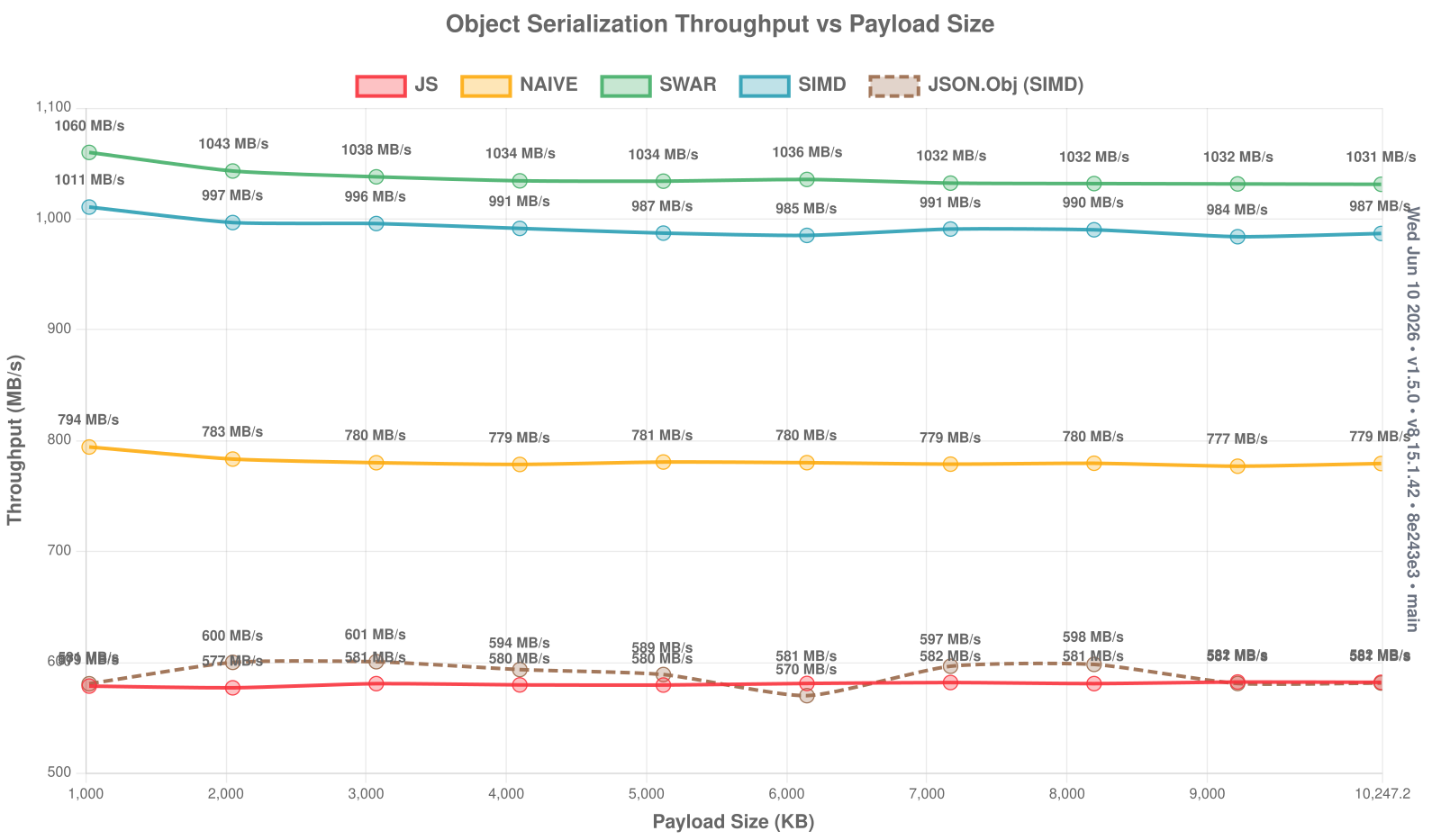
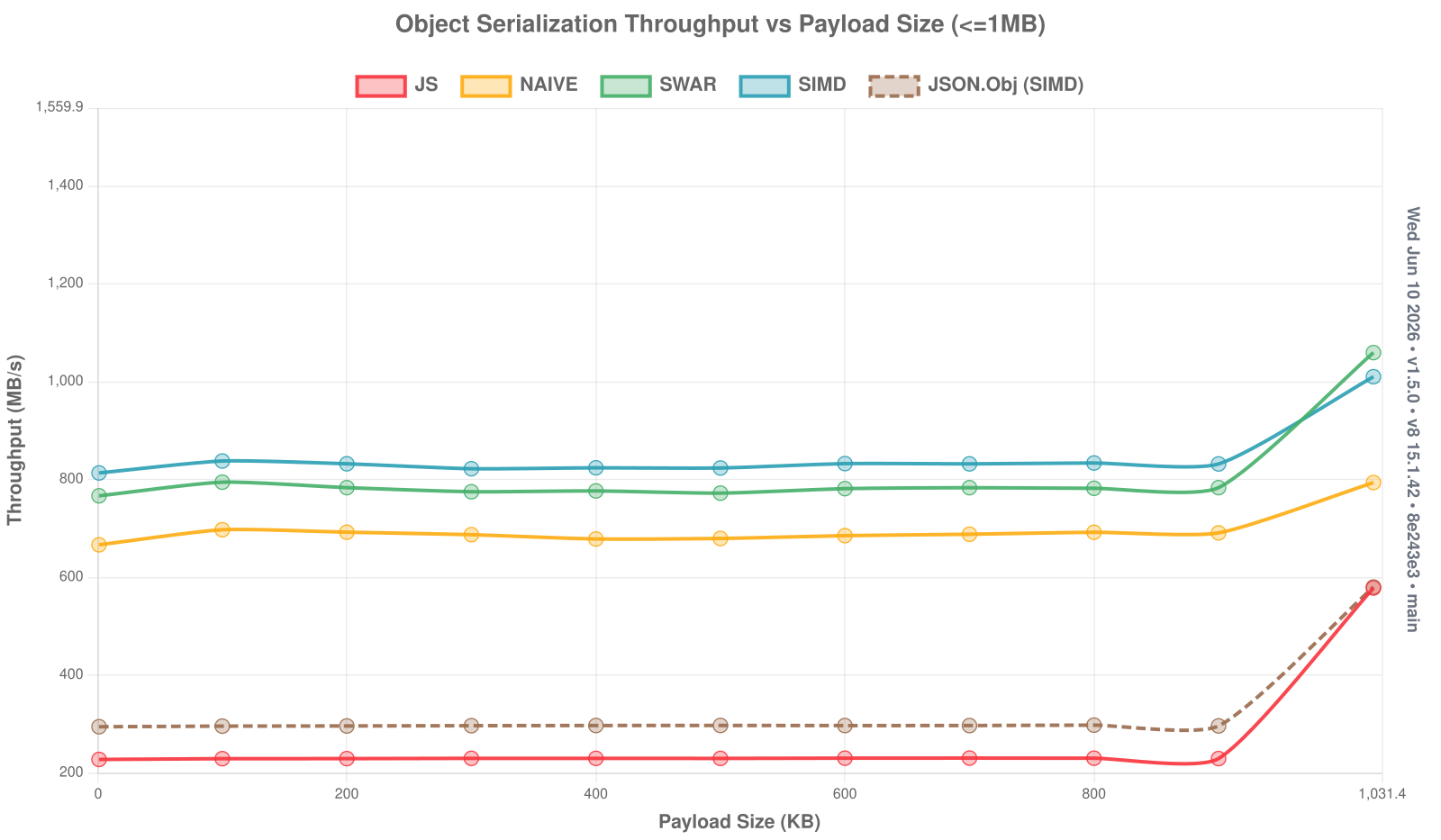
Object deserialize charts (click to expand)
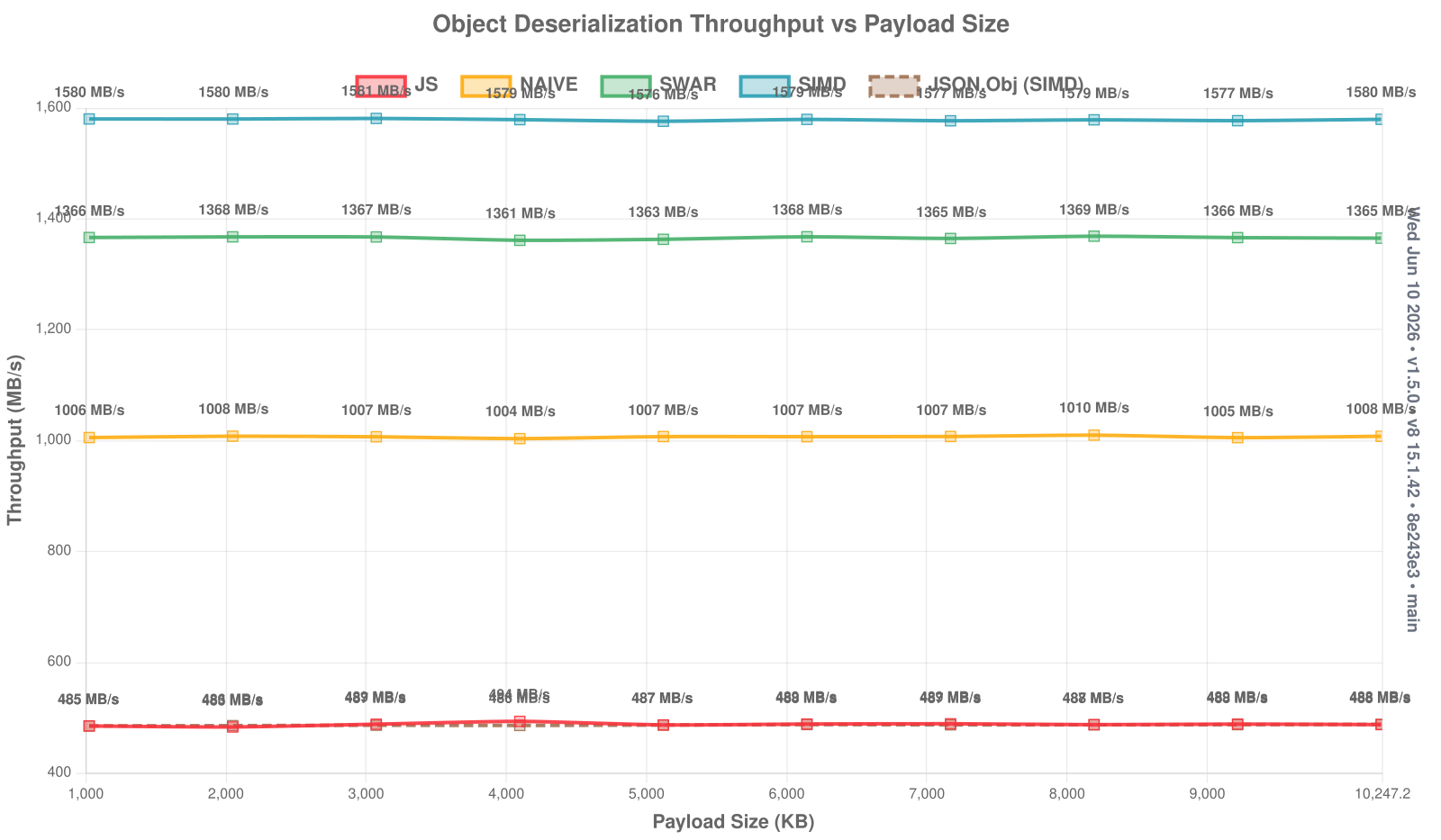
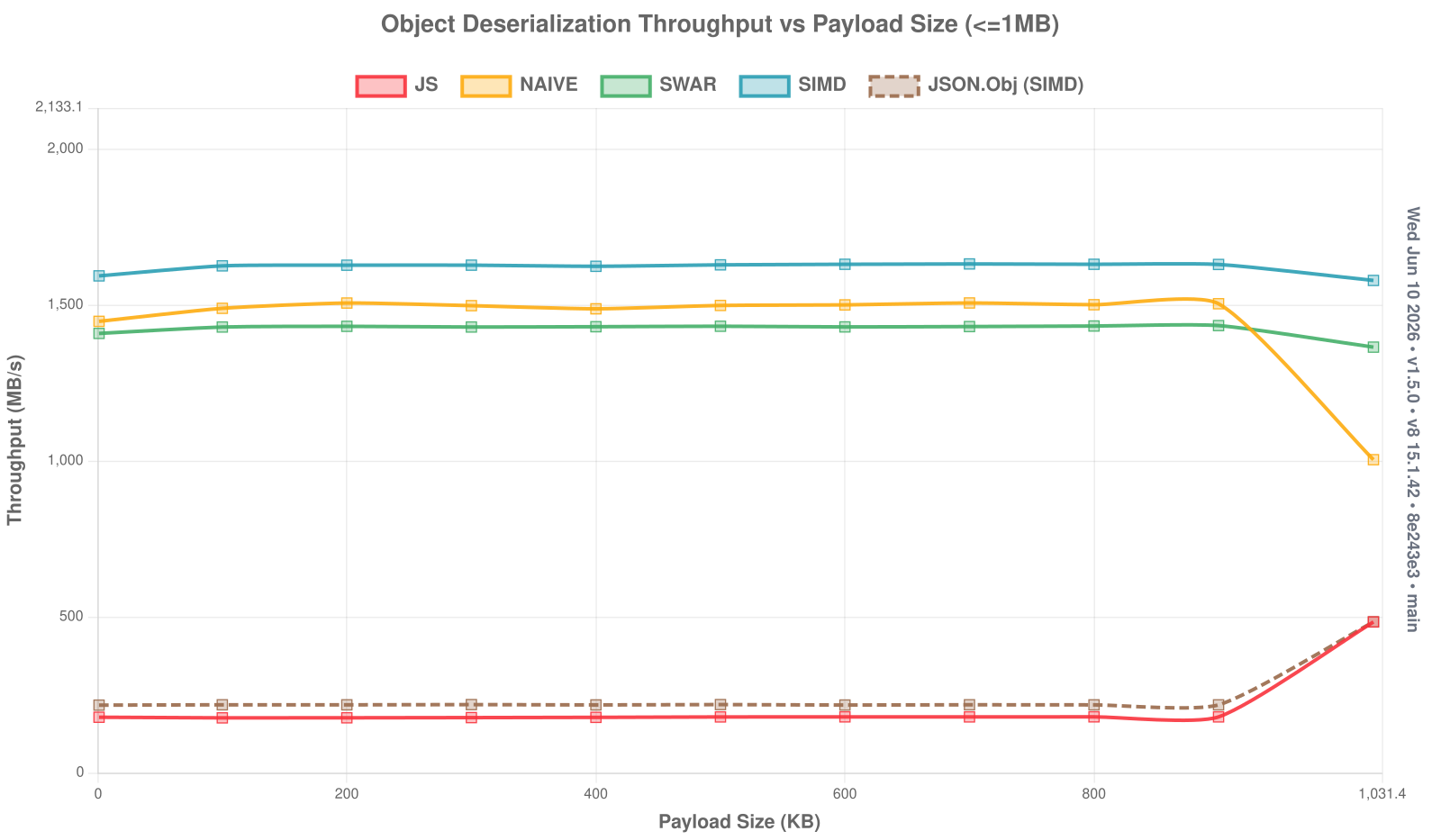
Primitive (de)serialize charts (click to expand)
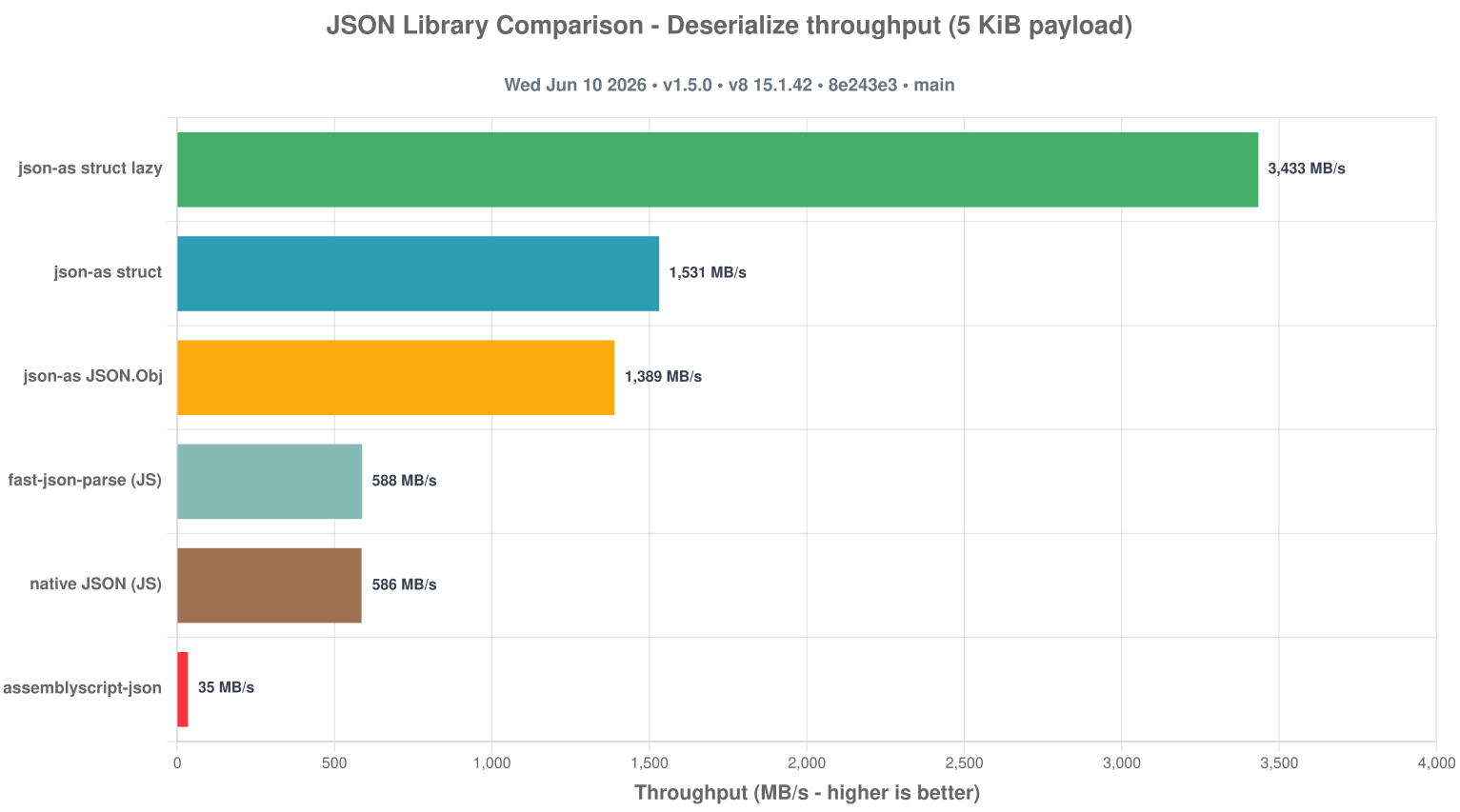
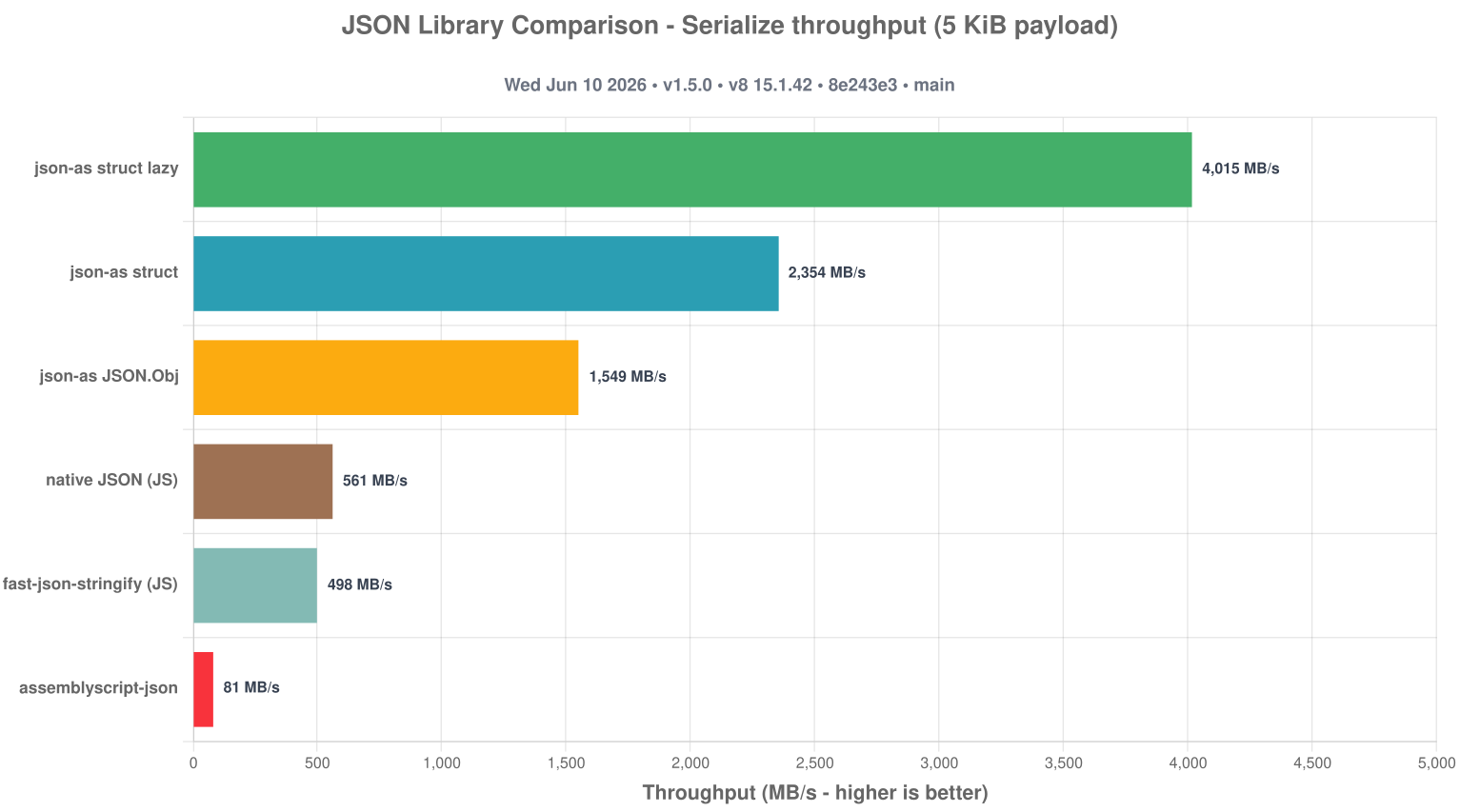
How json-as stacks up against other JSON libraries on a ~5 KiB GitHub-repo payload: JavaScript's native JSON and fast-json (each in a fresh V8), plus the assemblyscript-json package. The json-as bars (generated struct, lazy struct, and dynamic JSON.Obj) are averaged across the NAIVE / SWAR / SIMD scan modes.
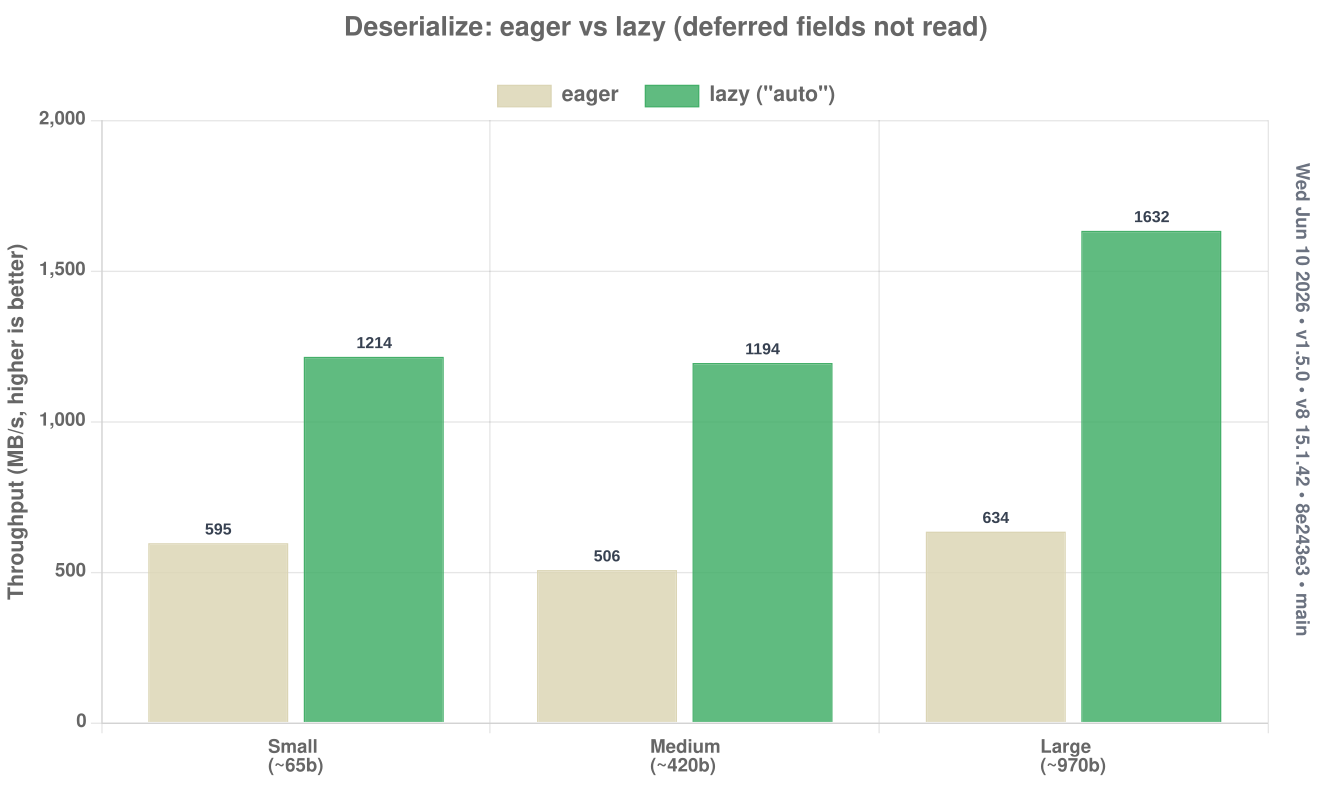
Mark a field @lazy (or JSON.Lazy<T>, or a whole class with @json({ lazy: "auto" })) to defer it: its raw JSON slice is stored at parse time and parsed only on first access. Fields you skip are never parsed, and untouched fields pass through their original bytes on serialize. See the Lazy Fields guide for the full API and trade-offs.
Skipping the deferred fields makes deserialization several times faster, and the win grows with payload size:
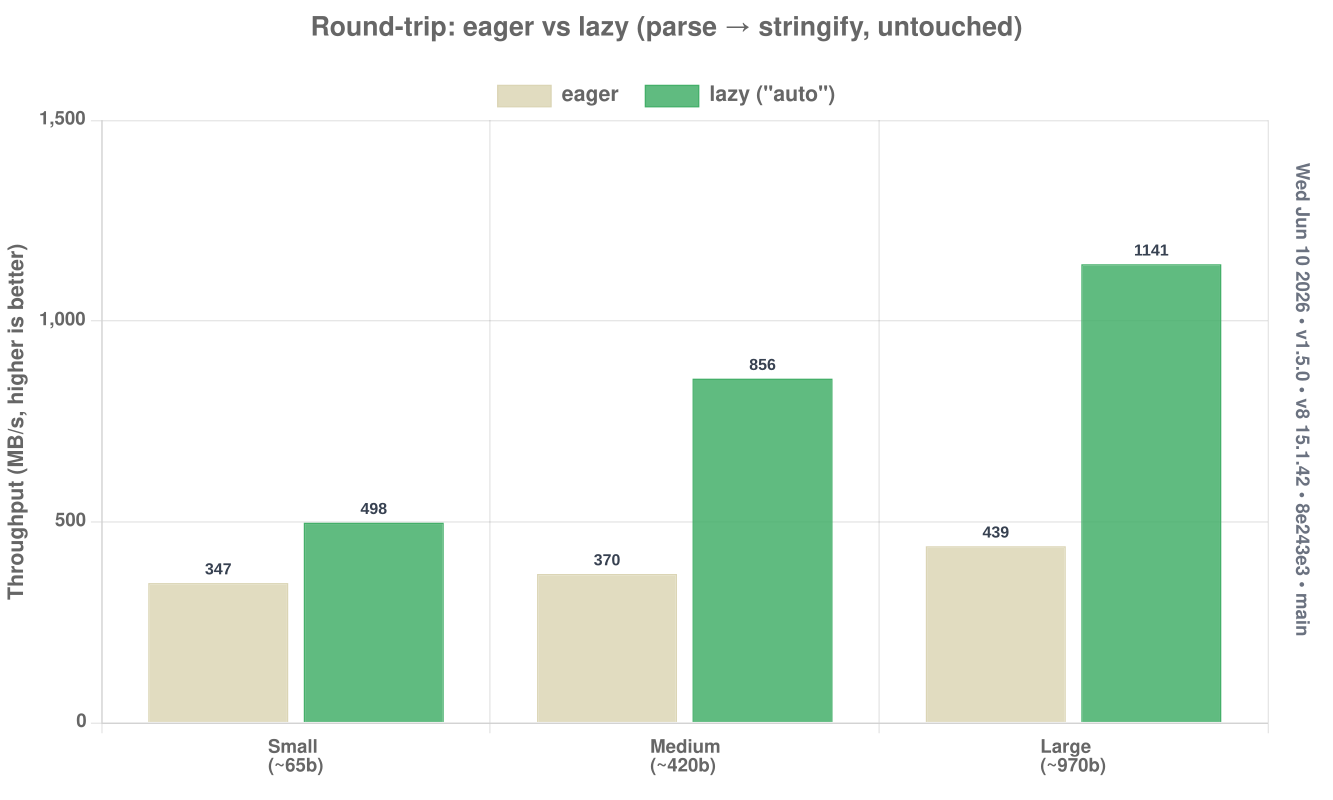
The proxy / filter / forward case - parse then re-serialize without reading the deferred fields - copies their raw bytes straight through:
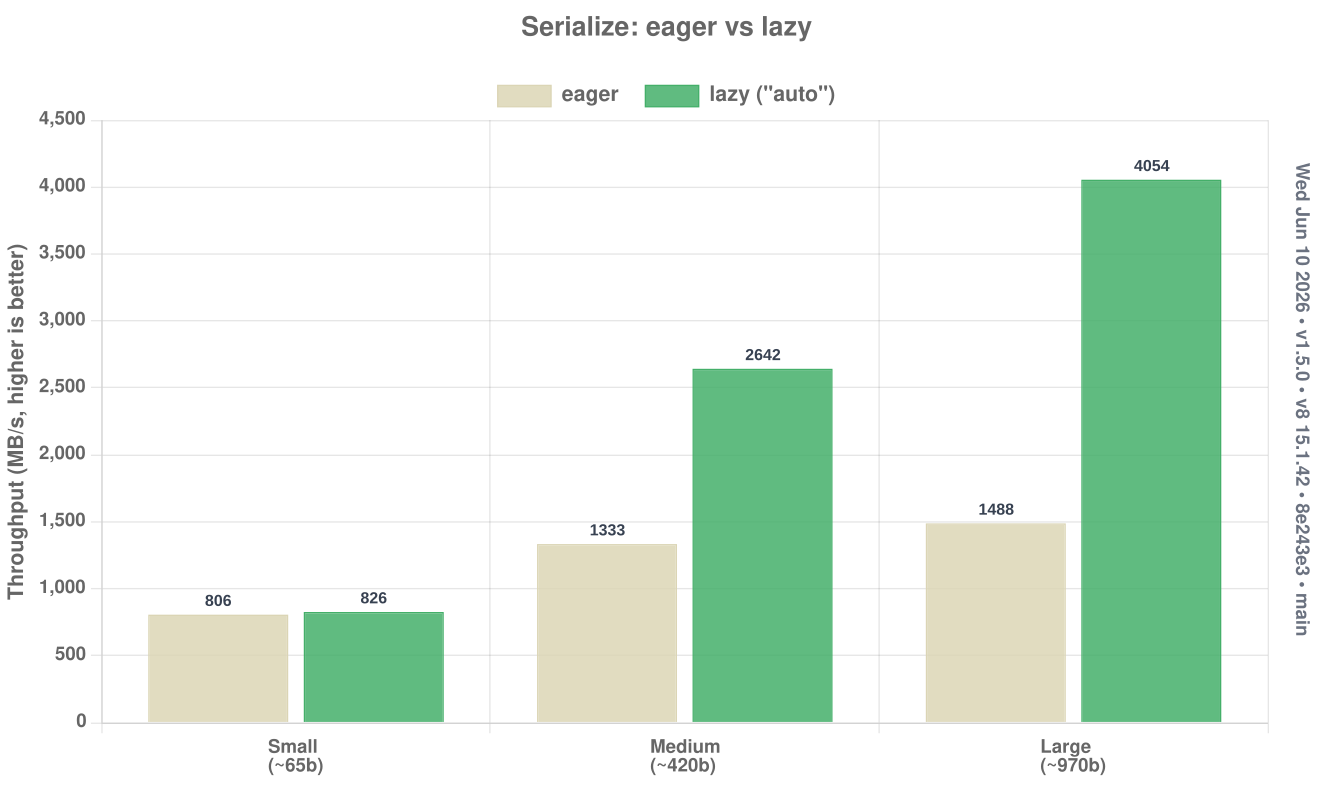
Re-emitting a parsed object forwards the untouched fields' raw bytes instead of rebuilding them:
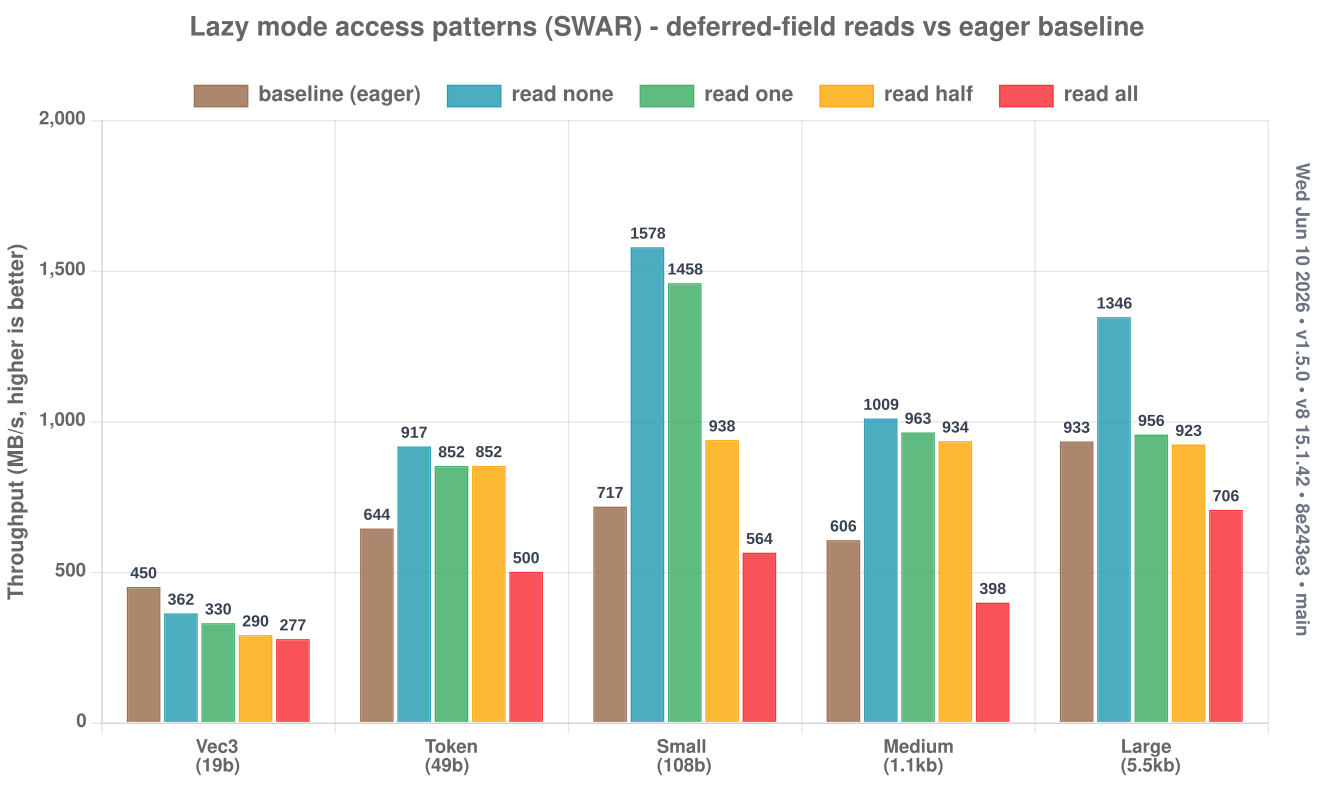
Access-pattern comparison (click to expand)
Lazy cost scales with how much you actually read. For each payload (vec3 → large) the chart compares a lazy parse that reads none, one, half, or all of its deferred fields against the eager full-parse baseline. Reading nothing or a single field is far faster than eager; reading everything approaches it (the work is deferred, not removed). SWAR only, since that's the mode the lazy fast-path is showcased in:
Instead of using flags for setting options, json-as is configured by environmental variables.
Here's a short list:
JSON_CACHE (default: 0) - Enables and sizes string cache. Supports true|false, raw bytes (JSON_CACHE=1048576), bits (JSON_CACHE=512kb, 2mb, 1gb), and bytes (JSON_CACHE=64KB, 2MB, 1GB). May boost string serialization in excess of 22 GB/s.
JSON_DEBUG (default: 0) - Sets the debug level. May be within range 0-3
JSON_MODE (default: SWAR) - Selects which mode should be used. Can be NAIVE,SWAR,SIMD. Note that --enable simd may be required.
JSON_USE_FAST_PATH (default: 1) - The transform emits the fast __DESERIALIZE implementation for generated structs by default. Set to 0, false, off, or no to force slow-path-only output. See FAST_PATH_DESERIALIZE.md for the current support matrix, known gaps, and dedicated test command.
JSON_WRITE (default: "") - Select a series of files to output after transform and optimization passes have completed for easy inspection. Usage: JSON_WRITE=.path-to-file-a.ts,./path-to-file-b.ts
Benchmarks are run directly on top of v8 for tighter control over the engine configuration.
- Install the local benchmark prerequisites:
npm install -g jsvu
jsvu --engines=v8- Add
~/.jsvu/binto yourPATHand make surewasm-optis installed:
export PATH="${HOME}/.jsvu/bin:${PATH}"
sudo apt-get install -y binaryen- Install project dependencies:
npm install- Run either benchmark suite directly:
npm run bench:as
npm run bench:js
The AS suite includes lazy variants - small.lazy.bench.ts, medium.lazy.bench.ts, large.lazy.bench.ts, token.lazy.bench.ts, and vec3.lazy.bench.ts - which mark their structs @json({ lazy: "auto" }) and dump to <name>-lazy logs, so eager and lazy can be compared side by side. Run one on its own with:
bun run bench:as medium.lazy --mode simdNote:
large.lazy.bench.tsstresses the optimizer -lazy: "auto"on the ~150-fieldRepogenerates a getter and serialize branch per field, which can overrun stock Binaryen (it crashes during optimize). Build it with a patched/larger-budget Binaryen, or prefer per-field@lazyon very wide schemas.
- Build charts from the latest local logs:
npm run charts:buildOr run the full local benchmark flow in one step:
npm run benchJSON_DEBUG=1 - Prints out generated code at compile-time
JSON_DEBUG=2 - The above and prints keys/values as they are deserialized
JSON_WRITE=path-to-file.ts - Writes out generated code to path-to-file.json.ts for easy inspection
For a deep dive into how json-as works internally, including the transform system, optimization modes (NAIVE, SWAR, SIMD), and buffer management, see ARCHITECTURE.md.
For a code-oriented repository walkthrough that maps the runtime, transform, tests, and benchmark files to their concrete responsibilities, see PROJECT_WALKTHROUGH.md.
We welcome contributions! Please see CONTRIBUTING.md for guidelines on:
- Setting up your development environment
- Running tests and benchmarks
- Code style and commit conventions
- The pull request process
A few companies and open-source projects use json-as!
| Company/Project | Description |
|---|---|
| Impart Security | API security platform |
| Hypermode | AI infrastructure |
| Steer Finance | DeFi protocol |
| Secretarium | Confidential computing |
| Klave | Privacy-first platform |
| Bifrost | Open source project by Maxim HQ |
| Massa Labs | Massa blockchain tooling |
| Seda Protocol | Wasm-based blockchain VM |
This project is distributed under an open source license. Work on this project is done by passion, but if you want to support it financially, you can do so by making a donation to the project's GitHub Sponsors page.
You can view the full license using the following link: License
Please send all issues to GitHub Issues and to converse, please send me an email at me@jairus.dev
- Email: Send me inquiries, questions, or requests at me@jairus.dev
- GitHub: Visit the official GitHub repository Here
- Website: Visit my official website at jairus.dev
- Discord: Contact me at My Discord or on the AssemblyScript Discord Server