
FerriteGmsh tries to simplify the conversion from a gmsh mesh to a Ferrite mesh.
]add FerriteGmsh

The above example is taken from the test_mixed_grid.jl file which can be found in the test folder.
This package offers two workflows. The user can either load an already defined geometry by a .msh,.geo file or use it in an interactive way.
The first approach can be achieved by
using FerriteGmsh

togrid("meshfile.msh")
togrid("meshfile.geo") #gets meshed automatically
while the latter is done by
using FerriteGmsh

gmsh.initialize()

# do stuff to describe your gmsh model

dim = Int64(gmsh.model.getDimension())
facedim = dim - 1

# renumber the gmsh entities, such that the final used entities start by index 1
# this step is crucial, because Ferrite.jl uses the implicit entity index based on an array index
# and thus, need to start at 1
gmsh.model.mesh.renumberNodes()
gmsh.model.mesh.renumberElements()

# transfer the gmsh information
nodes = tonodes()
elements, gmsh_elementidx = toelements(dim)
# repair cells that Gmsh emitted with the opposite orientation; must happen before
# `tofacetsets` below, because flipping a cell renumbers its local facets
reorient!(elements, nodes)
cellsets = tocellsets(dim, gmsh_elementidx)

# "Domain" is the name of a PhysicalGroup and saves all cells that define the computational domain
domaincellset = cellsets["Domain"]
elements = elements[collect(domaincellset)]

boundarydict = toboundary(facedim)
facetsets = tofacetsets(boundarydict, elements)
gmsh.finalize()

using Ferrite
Grid(elements, nodes, facetsets=facetsets, cellsets=cellsets)Ferrite might have a different element node-numbering scheme if compared to Gmsh. For correct portability of a mesh from Gmsh, it is important to transform Gmsh numbering in the one that Ferrite is expecting. Having the same numbering is important because the numbering provides information about which basis function is placed at each position, as well as the orientation of the elements.
FerriteGmsh supports every cell type that Ferrite defines. Two Dicts in src/FerriteGmsh.jl describe the translation:
gmshtoferritecellmaps the Gmsh element name (as reported bygmsh.model.mesh.getElementProperties) to the Ferrite cell type,gmshtoferritepermholds the node permutation for those element types whose numbering differs between the two codes, such thatferrite_cell_nodes[i] == gmsh_element_nodes[perm[i]]. Element types absent from it use the identity permutation.
To check the numbering used in Ferrite, we could for example generate a grid with a single element, for a QuadraticQuadrilateral that would be:
using Ferrite
grid = generate_grid(QuadraticQuadrilateral,(1,1))
Accessing the cells of that element:
julia> grid.cells
1-element Vector{QuadraticQuadrilateral}:
QuadraticQuadrilateral((1, 3, 9, 7, 2, 6, 8, 4, 5))
where the numbers refers to the global nodes ids, which can be easily visualized in the following manner using the package FerriteViz.
using Ferrite
using FerriteViz

grid =  generate_grid(QuadraticQuadrilateral,(1,1))

FerriteViz.wireframe(grid,markersize=14,strokewidth=20,textsize = 25, nodelabels=true,celllabels=true)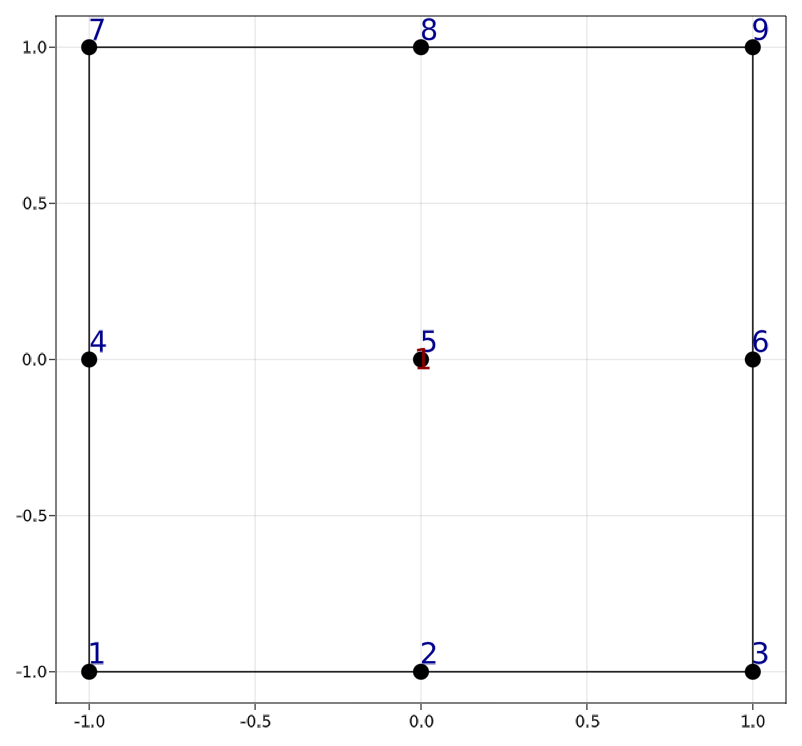
The Ferrite numbering (1, 3, 9, 7, 2, 6, 8, 4, 5) would have to match the numbering of Gmsh (see gmsh docs).
In the particular case of the QuadraticQuadrilateral, the numbering used in Ferrite and the numbering used in Gmsh matches, so this element only needs an entry in gmshtoferritecell and no entry in gmshtoferriteperm.
If the numbering does not match, like for example in the QuadraticTetrahedron, an entry in gmshtoferriteperm specifies the correct numbering. Such an entry is found by matching the Gmsh local node coordinates -- the fifth return value of gmsh.model.mesh.getElementProperties -- against Ferrite.reference_coordinates(Ferrite.geometric_interpolation(cell)), up to the affine map between the two reference domains.
All cell types that Ferrite defines are supported:
| Gmsh element | Ferrite cell | reordered |
|---|---|---|
Line 2 |
Line |
|
Line 3 |
QuadraticLine |
|
Triangle 3 |
Triangle |
|
Triangle 6 |
QuadraticTriangle |
|
Quadrilateral 4 |
Quadrilateral |
|
Quadrilateral 8 |
SerendipityQuadraticQuadrilateral |
|
Quadrilateral 9 |
QuadraticQuadrilateral |
|
Tetrahedron 4 |
Tetrahedron |
|
Tetrahedron 10 |
QuadraticTetrahedron |
✓ |
Hexahedron 8 |
Hexahedron |
|
Hexahedron 20 |
SerendipityQuadraticHexahedron |
✓ |
Hexahedron 27 |
QuadraticHexahedron |
✓ |
Prism 6 |
Wedge |
|
Prism 18 |
QuadraticWedge |
|
Pyramid 5 |
Pyramid |
✓ |
Wedge, Pyramid and SerendipityQuadraticQuadrilateral require Ferrite v1, QuadraticWedge requires a Ferrite version that defines it.
Gmsh element types that are not in this table -- such as the higher order variants Triangle 10 or Tetrahedron 20, or the second order Prism 15 and Pyramid 14 -- have no counterpart in Ferrite. Meshes containing them raise an error naming the offending element type; re-mesh with gmsh.model.mesh.setOrder(1) or setOrder(2).
Gmsh numbers the nodes of an element following the orientation of the entity it belongs to, so a surface whose normal points along -z produces clockwise elements while Ferrite requires a positive Jacobian determinant. togrid detects such cells and relabels them with reorient!, which keeps a cell on exactly the same physical region and only reverses its orientation. Correctly oriented cells are left untouched, so ReverseMesh Surface{...}; in the .geo file is no longer needed.