Fix stuck chat + freezed view - #2533
Conversation




This comment has been minimized.
This comment has been minimized.
This comment has been minimized.
This comment has been minimized.

|
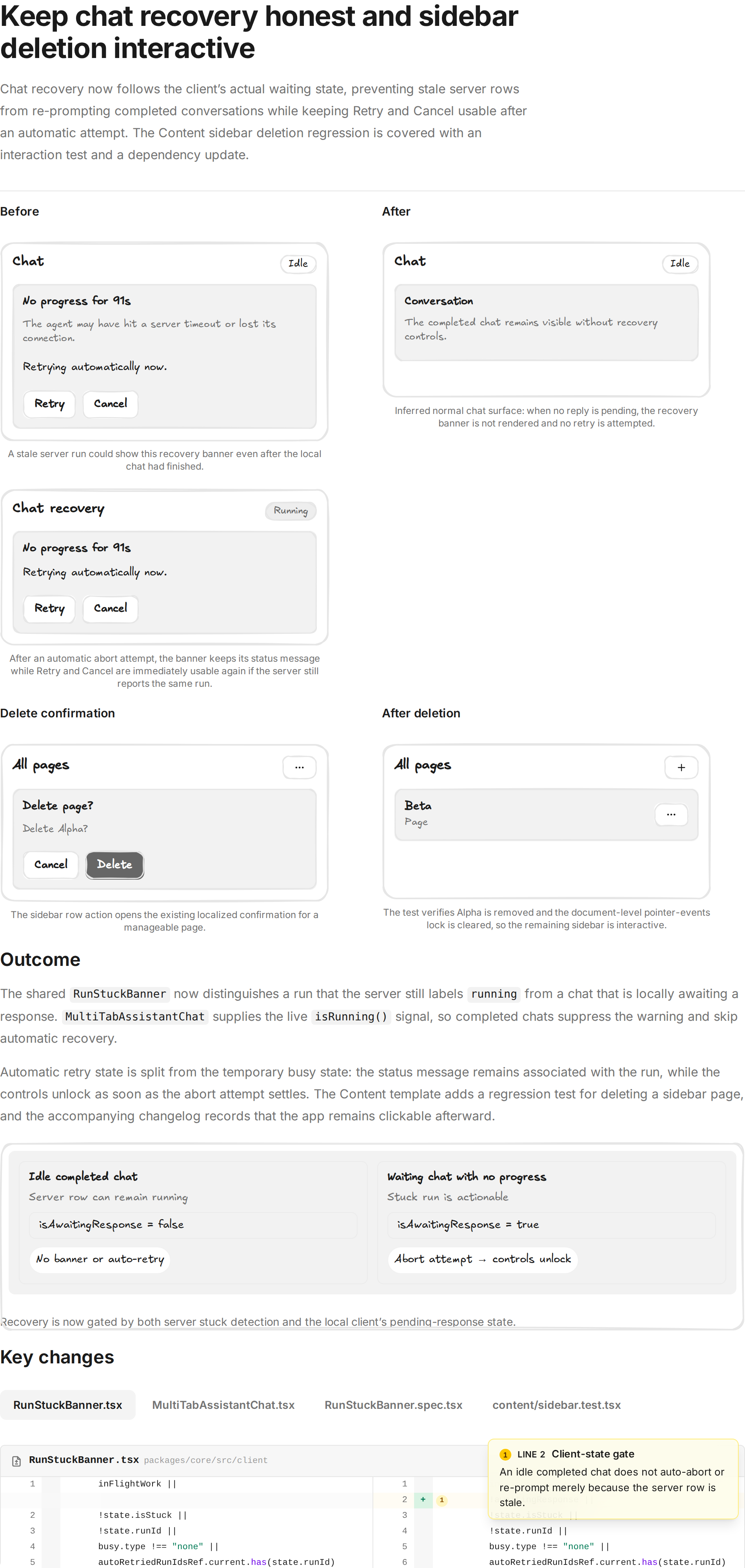
Here's a visual recap of what changed: Open the full interactive recap |
This comment has been minimized.
This comment has been minimized.
![builder-io-integration[bot]](https://avatars.githubusercontent.com/in/353721?s=60&v=4)
This comment was marked as outdated.
This comment was marked as outdated.
Sorry, something went wrong.

There was a problem hiding this comment.
Builder reviewed your changes and found 1 potential issue 🟡
Review Details
Incremental Code Review Summary
The latest commit fixes the previously reported dependency issue by adding the derived awaitingResponse value to the RunStuckBanner auto-retry effect dependencies. I verified the idle-chat gate, the MultiTabAssistantChat isRunning() wiring, the separated automatic-retry/busy state, and the Radix override and lockfile consistency. The focused agent reviews found no additional correctness, security, or performance problems beyond the new UX issue below. The prior review comment was verified fixed and has been resolved.
Key Findings
🟡 MEDIUM: After an automatic retry settles without changing the run ID, the controls become enabled but autoRetriedRunId remains set. If the user then clicks manual Retry, the banner continues to say “Retrying automatically now.” while the user-initiated request is in progress. Clear the automatic marker when starting manual Retry or include the busy state in the message condition.
🧪 Browser testing: Planned but could not execute — all executor sessions lacked browser automation tools after retry; the dev server was healthy and /content and /chat were reachable.
| {stuckSeconds != null ? ` for ${stuckSeconds}s` : ""}. The agent may | ||
| have hit a server timeout or lost its connection. | ||
| {autoRetry && busyType === "retry" | ||
| {autoRetry && autoRetriedRunId === state.runId |
There was a problem hiding this comment.
🟡 Clear the automatic retry message before manual retry
When an automatic retry settles without changing the run ID, autoRetriedRunId remains set. A subsequent manual Retry therefore still renders “Retrying automatically now.” while the user’s request is running; clear the marker in the manual handler or gate this message on the automatic busy state.


2 participants


This PR fixes two separate bugs where the UI stopped responding and the only way out was to reload the page.
Deleting a page froze the Content sidebar
Deleting a page from the sidebar left the whole app unclickable. The page still got deleted, and the sidebar still looked normal, but no button or link worked until you refreshed.
The cause was in our dependencies, not in the Content code. We had six copies of the Radix package that dims the page behind a dialog. The row menu used one copy and the delete confirmation used another, and the two disagreed about how to undo the dimming when the dialog closed. The result was an invisible layer left over the whole page.
The fix pins that package to a single copy for the whole workspace, next to the other shared packages we already pin. No Content code needed to change.
The "chat looks stuck" popup appeared on finished chats
After the agent finished its work and the chat went quiet, a warning popup appeared saying the chat looked stuck. Neither the Retry nor the Cancel button could be clicked. The popup also restarted the agent on its own, asking it to continue work the user considered done.
There were two problems. The popup only looked at the server to decide whether a chat was stuck, and the server can keep a finished run marked as still running for a while. It never checked whether the chat was actually waiting for a reply. On top of that, the two buttons were switched off while a retry was in progress, and in this case nothing ever switched them back on.
Now the popup only shows when the chat is genuinely waiting for a reply, and the buttons always become clickable again once a retry finishes. A real stuck chat still shows the warning, including after a page reload.
Testing
Both fixes have new tests that fail without the change. The Content one drives the real sidebar menu and confirms the page is still clickable after a delete. The chat one covers both an idle chat staying quiet and the buttons staying usable.