


An exceptionally powerful, feature-rich assistant for InvenTree designed to automate and simplify your component intake, cataloging, and warehouse operations.
From zero-click distributor barcode scanning to a 100% keyboard-and-mouse-free warehouse terminal, SmartParts eliminates manual entry errors and supercharges efficiency.
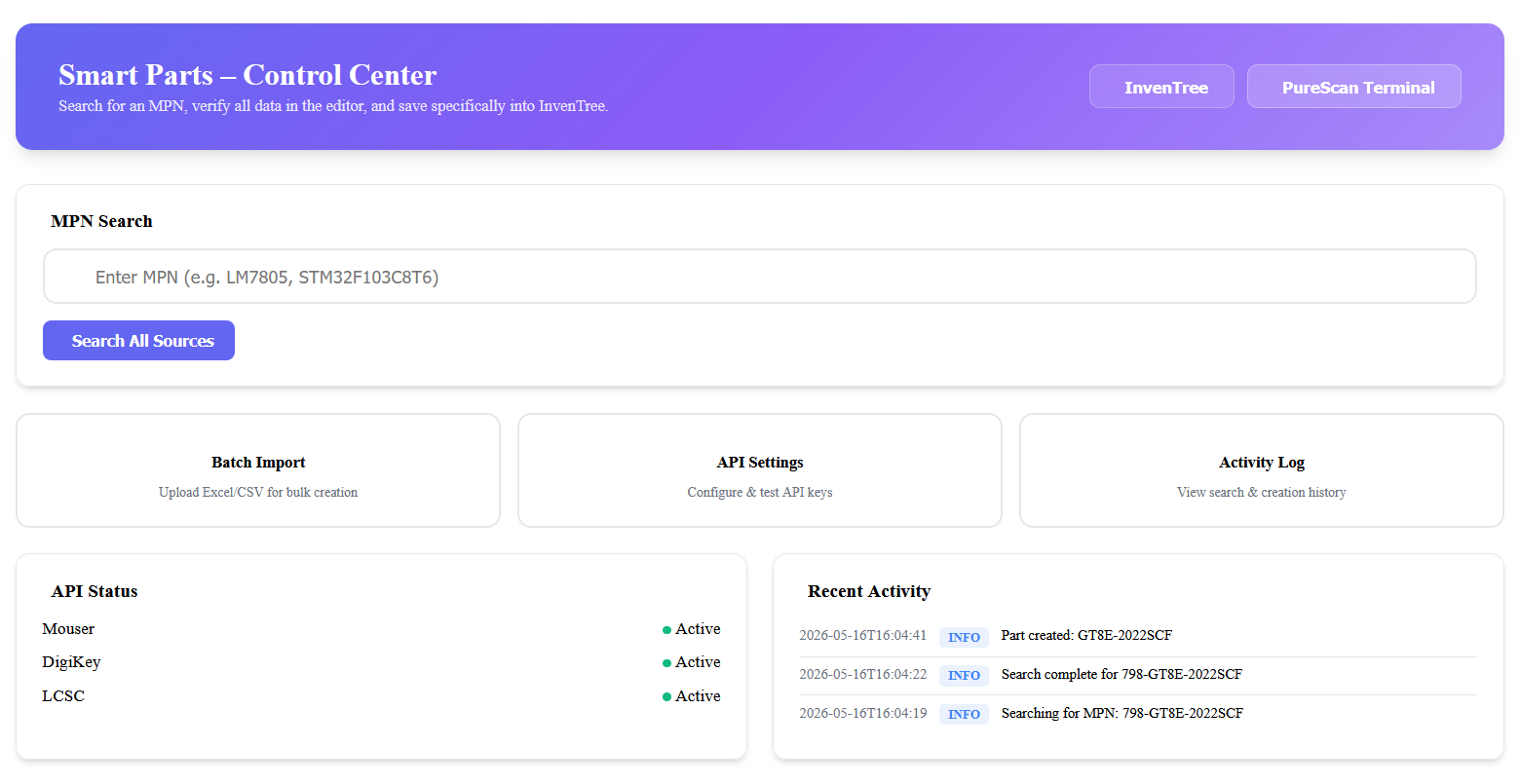
| Module | Core Capability | Key Technical Feature |
|---|---|---|
| Multi-Source MPN Lookup | Single scan retrieves full component specs across 5 major distributor APIs. | Integrated clients for Mouser, DigiKey, LCSC, TME, and element14. |
| Self-Learning Parameter Normalization | Automatically cleans and standardizes electrical/mechanical values into canonical units. | Regex-based sanitization pre-processing, custom overrides, and a "Catch & Learn" database mapping UI. |
| Dedicated Mapping Dashboard | Clean management UI under /parameters/ with autocomplete and ignore drop heuristics. |
Dynamic search inputs populated by DB ParameterTemplate names + built-in schemas. |
| PureScan Terminal | 100% mouse-free kiosk terminal for high-speed stock operations. | Barcode-driven state machine with quantity accumulator, location lookup, and print auto-routing. |
| Hardware Barcode Integration | Native parsing of complex distributor label formats. | Keyboard Wedge GS (ASCII 29) parser for high-density DataMatrix barcodes. |
| Batch BOM Import | Bulk-creates parts from CAD BOMs with smart duplicate handling. | Fuzzy category auto-mapping with interactive user correction learning. |
| Automated Label Dispatch | Auto-generates and routes labels upon stock actions. | Deep integration with Zebra/Dymo network printers and PDF print engines. |
| Clean Logging & Security | File-backed thread-safe activity logging and URL credential stripping. | Robust URL regex filters that scrub API keys, parameters, and tokens from exception tracebacks. |
SmartParts query engines run simultaneously to fetch high-fidelity data sheets, packaging info, price breaks, and images.
                                      ┌── Mouser API (v2)
                                      ├── DigiKey API (v4 OAuth2)
[Scan Barcode] ──► [Multi-API Search] ├── LCSC Search Engine
                                      ├── TME API (HMAC-SHA1 signed)
                                      └── element14 / Farnell REST API
- Dual-Mode Header Handling: Transparently switches user-agents to bypass Akamai/bot-protection networks on strict distributor platforms (e.g. Mouser) without sacrificing reliability.
- Intelligent Media Pipeline: Downloads product images, probes dimensions, validates
Content-Typeheaders, verifies magic bytes, and auto-compresses them before attaching them to InvenTree parts. - Fallback Priority Order: Configurable search fallbacks ensure that if one API lacks detail or encounters a rate limit, other enabled distributors automatically fill the missing fields.
- API Connection Diagnostic Tests: Instant test endpoints accessible in settings that confirm credentials, returning standard unified messaging (e.g.
Connected successfully. Test search returned: LM7805). - Robust Credential Filtering: Exception filters automatically strip query parameters from error stack-traces (e.g., hiding developer keys, tokens, or search payloads) before writing to logs.
Distributors represent the exact same component parameters under thousands of different naming schemas (e.g., "Mounting Type", "IC Mounting", "Capacitance", "Capacitance - Value"). The normalization engine ensures your database remains immaculate.
Before matching parameters, raw distributor strings undergo a multi-stage regex pre-processing step:
- Strips non-alphanumeric punctuation (hyphens, underscores, brackets, parentheses, slashes).
- Normalizes double spacing and trims whitespace.
- Converts to lowercase to guarantee deterministic matching against the map.
- Example:
"Output Voltage - Nom"──►"output voltage nom"──► matches Voltage Rating.
Electrical units are mathematically parsed, scaled, and formatted into standard engineering/SI notation:
- Capacitance:
0.00001 For10 microfarad──►10 µF;0.1uF──►100 nF. - Resistance:
4k7or4.7 kohm──►4.7 kΩ;1000000 ohm──►1 MΩ. - Inductance:
100uH──►100 µH;0.0022 H──►2.2 mH. - Voltage & Current:
100mV──►100 mV;0.001 A──►1 mA.
Unknown or unrecognized distributor parameters are handled dynamically via a dedicated management page:
- Pending Parameters Table: Logs incoming unknown parameters, displaying the distributor name and incrementing their appearance count.
- Active Mappings Table: Clear, sortable dashboard of all established parameter rules.
- Autocomplete canonical dropdowns: Users can map raw parameters using a live dropdown menu populated by database-backed InvenTree
ParameterTemplatetitles combined with the 100+ standard electronic unit names. - Permanent Drop Heuristics (Ignore): Mark a parameter as permanently ignored to completely drop it during the merge/creation pipeline, keeping your database completely free of useless placeholders (e.g., standard packaging details).
PureScan is a full-screen, responsive, 100% keyboard-and-mouse-free interface designed for tablet, desktop, or mobile kiosk deployment.
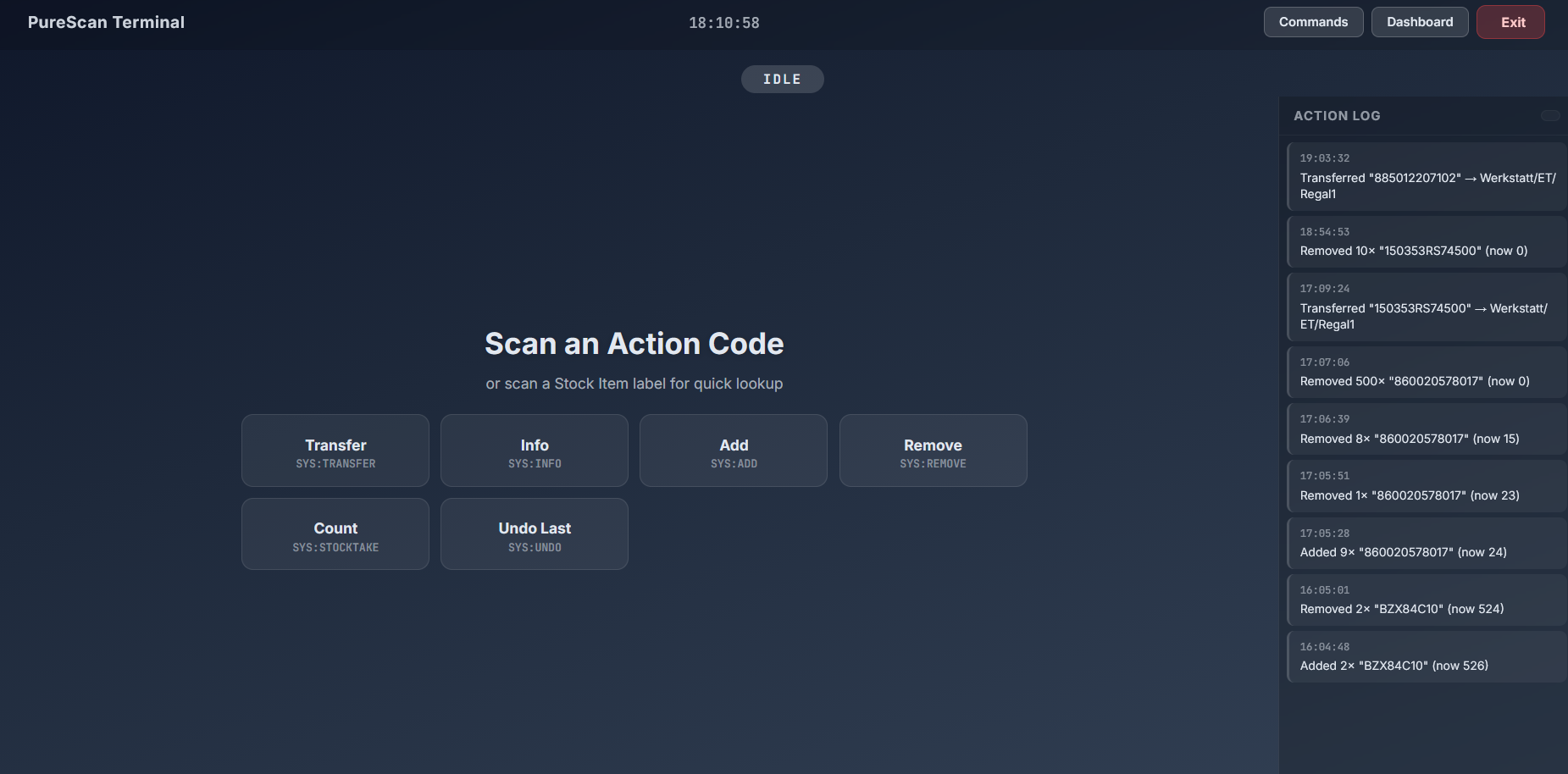
- Open the PureScan Terminal from the InvenTree navigation bar or SmartParts dashboard.
- Print the Command Sheet (which can be generated dynamically using the built-in standalone QR generator under
purescan/commands/). - Mount the sheet near your barcode scanner station.
[Scan Action Code] ──► [Scan Item Barcode] ──► [Scan QTY Code(s)] ──► [Auto-Executes]
Tip
The Quantity Accumulator System:
Multiple quantity scans within a 3-second window will automatically accumulate (e.g., scanning QTY:10 twice = QTY:20). The action fires automatically once the 3-second timer expires, removing the need for a physical keyboard or manual confirmation clicks.
| Barcode Code | Action | Details |
|---|---|---|
SYS:TRANSFER |
Transfer Stock | Relocates a stock item. Prompts to scan destination location barcode. |
SYS:ADD |
Add Stock | Increments quantity of the scanned stock item. |
SYS:REMOVE |
Remove Stock | Decrements quantity (with automatic negative depletion safeguards). |
SYS:STOCKTAKE |
Stocktake | Overwrites the current count with the exact physical count scanned. |
SYS:INFO |
Lookup Info | Displays full stock details, location tree, part specifications, and image. |
SYS:UNDO |
Undo Last | Reverts the immediately preceding transaction (e.g., in case of a scanning mistake). |
SYS:CANCEL |
Reset Terminal | Immediately aborts the current transaction and resets to the idle scanning state. |
SmartParts contains a robust Keyboard Wedge parsing pipeline designed to interpret high-density DataMatrix labels used by wholesale suppliers:
- GS character handling: Translates raw hardware keyboard wedge streams containing non-printable GS (Group Separator, ASCII 29) characters.
- Intelligent Splitting: Splits multi-field DataMatrix codes containing Supplier PN, Manufacturer PN (MPN), Lot Code, Date Code, and exact packaging quantities in a single trigger pull.
- Instant Creation: Automatically checks InvenTree for duplicates, creates the part if missing, creates the stock record, and fires a print job to the physical label printer.
Configure settings in InvenTree Settings → Admin Center → Plugins → SmartParts.
| Key | Type | Default | Description |
|---|---|---|---|
MOUSER_ENABLED |
bool |
True |
Enable/disable Mouser Search API. |
MOUSER_API_KEY |
str |
"" |
Mouser Electronics Search API v2 key. |
DIGIKEY_ENABLED |
bool |
True |
Enable/disable DigiKey API. |
DIGIKEY_CLIENT_ID |
str |
"" |
OAuth2 Client ID for DigiKey API v4. |
DIGIKEY_CLIENT_SECRET |
str |
"" |
OAuth2 Client Secret for DigiKey API v4. |
LCSC_ENABLED |
bool |
True |
Enable LCSC lookup (does not require authentication keys). |
ELEMENT14_ENABLED |
bool |
False |
Enable element14/Farnell/Newark lookup. |
ELEMENT14_API_KEY |
str |
"" |
REST API Key registered at Farnell's Partner portal. |
ELEMENT14_STORE |
str |
"uk.farnell.com" |
Storefront to query (e.g., de.farnell.com, www.newark.com). |
TME_ENABLED |
bool |
False |
Enable TME.eu lookup. |
TME_API_TOKEN |
str |
"" |
Public Developer Token for TME REST API. |
TME_API_SECRET |
str |
"" |
HMAC signature key for TME. |
TME_COUNTRY |
str |
"DE" |
Two-letter country code for price/stock calculation. |
TME_CURRENCY |
str |
"EUR" |
Currency for TME price breaks (e.g. EUR, USD, PLN). |
| Key | Type | Default | Description |
|---|---|---|---|
API_PRIORITY |
str |
"mouser,digikey,element14,tme,lcsc" |
Comma-separated list specifying the source merge priority. |
FUZZY_THRESHOLD |
int |
45 |
Minimum confidence score (0-100) for category auto-mapping. |
DEFAULT_CATEGORY |
str |
"Uncategorized" |
Default category path if no fuzzy match passes threshold. |
DUPLICATE_ACTION |
str |
"ask" |
Duplicate MPN action: "ask", "update", or "skip". |
LEARNED_PARAMETER_MAPPINGS |
JSON |
"{}" |
Map rules for raw distributor parameters to canonical names. |
TRACKED_UNKNOWN_PARAMETERS |
JSON |
"{}" |
Auto-logged list of unrecognized parameters awaiting manual mapping. |
LEARNED_CATEGORY_MAPPINGS |
JSON |
"{}" |
Auto-learned manual category correction overrides. |
| Key | Type | Default | Description |
|---|---|---|---|
AUTO_CREATE_MANUFACTURERS |
bool |
True |
Auto-create the manufacturer Company in InvenTree if not present. |
AUTO_CREATE_SUPPLIERS |
bool |
True |
Auto-create the supplier Company in InvenTree if not present. |
DEFAULT_STOCK_LABEL |
int |
0 |
Default template ID for physical stock labels. |
DEFAULT_PRINT_PLUGIN |
str |
"" |
Specific printer plugin slug (e.g. "inventreelabelmachine"). |
LOG_RETENTION_DAYS |
int |
30 |
Number of days to retain system log entries. |
- Go to your InvenTree dashboard.
- Select Settings ──► Plugins ──► Install Plugin.
- Configure the installation details:
- Package Name:
inventree-smart-parts - Source URL:
git+https://github.com/0neShot/SmartParts.git#egg=inventree-smart-parts
- Package Name:
- Confirm by clicking Install.
- Restart your InvenTree server and background worker containers:
docker restart inventree-server inventree-worker
- Log in as an Administrator, navigate to the Plugin Admin Center, and toggle the
SmartPartsactivation checkbox to active.
Important
Required Mixin Permissions: Ensure that you enable all plugin integrations in InvenTree settings:
- Enable App integration
- Enable URL integration
- Enable navigation integration
- Enable interface integration
- Enable event integration
SmartParts/
├── setup.py                          # Setup packaging file
├── MANIFEST.in                       # Asset packing manifests
├── README.md                         # Product Documentation (This file)
│
└── inventree_smart_parts/            # Core Package Directory
    ├── __init__.py                   # Core package loader
    ├── core.py                       # Main plugin lifecycle, settings, and routing
    ├── views.py                      # HTTP views, API endpoints, and data interfaces
    │
    ├── api_clients/                  # External Distributor Clients
    │   ├── base.py                   # Standard HTTP Client with bot bypass and regex credential filtering
    │   ├── mouser.py                 # Mouser Search API Integration
    │   ├── digikey.py                # DigiKey API integration
    │   ├── lcsc.py                   # LCSC HTML scraper client
    │   ├── element14.py              # element14/Farnell/Newark REST Client
    │   └── tme.py                    # TME API Integration with HMAC signatures
    │
    ├── services/                     # Business Logic
    │   ├── activity_logger.py        # Transaction logger & DB persistence (smart_parts_activity.jsonl)
    │   ├── assembly_builder.py       # Assembly & BOM parsing mechanisms
    │   ├── category_mapper.py        # Category heuristics fuzzy mapping
    │   ├── data_merger.py            # Multi-API database merging & parsing
    │   ├── duplicate_checker.py      # Prevent exact/fuzzy duplicate MPNs
    │   ├── image_handler.py          # Probing & downloading images
    │   ├── parameter_normalizer.py   # Regex sanitization & unit scale engine
    │   ├── part_creator.py           # Core InvenTree part generation
    │   └── stock_manager.py          # Stock manipulation and print manager
    │
    ├── batch/                        # CAD Import Layer
    │   ├── altium_parser.py          # Parses CSV/XLSX BOMs from Altium Designer
    │   └── importer.py               # Handles large spreadsheet bulk imports
    │
    ├── tools/                        # Utility Scripts
    │   └── generate_command_sheet.py # Python SVG Command Sheet generator
    │
    ├── templates/                    # Django HTML Templates
    │   └── inventree_smart_parts/
    │       ├── dashboard.html        # SmartParts control panel
    │       ├── settings_page.html    # Custom mappings & settings UI
    │       ├── parameter_dashboard.html # Dedicated Parameter Mappings Dashboard
    │       ├── logs.html             # System log viewer console page
    │       ├── batch_import.html     # CAD BOM importer page
    │       ├── purescan.html         # PureScan terminal panel
    │       ├── purescan_commands.html# PureScan QR deep-link command sheet
    │       └── search_results.html   # Component API details
    │
    └── static/                       # Static CSS/JS assets
        └── inventree_smart_parts/ui/
            ├── purescan.js           # Kiosk interface state machine
            └── scanner.js            # Wedge GS barcode engine
When dealing with thousands of individual electronic components, typing out manufacturing data, searching for datasheets, and creating part parameters manually is a massive waste of valuable engineering time.
I built SmartParts to solve this headache cleanly. By combining distributor aggregation, standardized parameter cleaning, and a fully physical-barcode-driven interface into a seamless InvenTree GUI plugin, I automated our Formula Student inventory management.
1 Scan + 1 Click = Done.
Developed with passion by 0neShot / StarkStrom Augsburg e.V. Powered by InvenTree