This repository was archived by the owner on Feb 2, 2023. It is now read-only.
Repository navigation
This repository was archived by the owner on Feb 2, 2023. It is now read-only.
Take only first value from list of returned values #67
Description

Hi.
I am wondering whether it's somehow possible to take only first value (or value at location i) when receiving a list of values in json.
For example, for this output:
"data": [
    {
        "price": 1
    },
    {
        "price": 2
    },
]
I would like to get 1 using something like /data/price/[0].
Is this something currently possible?
Thanks
Activity
tordans commentedon Jan 30, 2018
@ronlut maybe check out https://gist.github.com/chrislkeller/5719258#gistcomment-2272498 => https://gist.github.com/allenyllee/c764c86ed722417948fc256b7a5077c4 which looks like it allows you to just select specific array items.
This forks might be outdated though since it is based on the gist-version of this script which - from my understanding - came before the github repo.
ronlut commentedon Jan 31, 2018
@tordans Thanks. I'll take a look at it and create a pull request to merge it with this repo :)
Hobbesball commentedon Feb 15, 2018
@tordans @ronlut did you get this to work, in the end? I'm trying to query my JSON results in the same way, but still get 'An array value cannot be found' errors.
e.g. my working call is
ImportJSON("http://europeana.eu/api/v2/search.json?query="books"&rows=0&start=1&profile=facets&wskey=api2demo", "/facets/fields/label", "noTruncate,noHeaders")I want to be able to get different rows in the 'fields' array, like so:
ImportJSON("http://europeana.eu/api/v2/search.json?query="books"&rows=0&start=1&profile=facets&wskey=api2demo", "/facets/fields[2]/label", "noTruncate,noHeaders"), which should work with @allenyllee's script but doesn't.allenyllee commentedon Feb 15, 2018
Hi @Calvinwuyts ,
It seems that the parameter in your function call may have two problems:
The URL "http://europeana.eu/api/v2/search.json?query="books"&rows=0&start=1&profile=facets&wskey=api2demo" seems broken, because the double quote of "books". It'll cause parsing error. Removing the double quote fix this.
The XPath "/facets/fields[2]/label" is incorrect, because "/facets" also need array index. Using "/facets[0]/fields[2]/label" it'll give you label in /facets[0]/fields[2], and similarly, "/facets[1]/fields[2]/label", "/facets[3]/fields[2]/label"... etc.
Below is the fixed code:
ImportJSON("http://europeana.eu/api/v2/search.json?query=books&rows=0&start=1&profile=facets&wskey=api2demo", "/facets[0]/fields[2]/label", "noTruncate,noHeaders")Hobbesball commentedon Feb 15, 2018
hi @allenyllee , thank you so much, that makes a bunch of sense! I got it to work perfectly. Thanks again!
ronlut commentedon Feb 15, 2018
@Calvinwuyts Sorry for joining late, you can take a look at @allenyllee's solution integrated into this library by looking at #68 :)
(forgot to update until I saw the message from you)
Hobbesball commentedon Feb 15, 2018
hiya @ronlut, thanks for the pull!
mtompkins commentedon Mar 12, 2018
I believe I'm seeing a sort of similar effect where the api call is returning all results that are equal or a subset of the query which is causing a little difficulty.
Example: http://whattomine.com/coins/214.json returns
If I try to extract the value at
difficulty, the return includes all 4difficulty*results:=ImportJSON("http://whattomine.com/coins/214.json", "/difficulty")returns:
Is it possible to limit the return to the explicit item?
allenyllee commentedon Mar 13, 2018
Hi @mtompkins ,
My gist version is OK. It seems that the PR #68 by @ronlut has not yet been merged.
mtompkins commentedon Mar 13, 2018
@allenyllee Thank you, however, I do not see this resolving the issue. Perhaps I misunderstand its usage. If I try
=ImportJSON("http://whattomine.com/coins/214.json", "/difficulty[0]")it fails.allenyllee commentedon Mar 13, 2018
@mtompkins Try
ImportJSON("http://whattomine.com/coins/214.json", "/difficulty")mtompkins commentedon Mar 13, 2018
Your GIST has the same effect - all 4 are returned.
allenyllee commentedon Mar 13, 2018
@mtompkins No, just one!
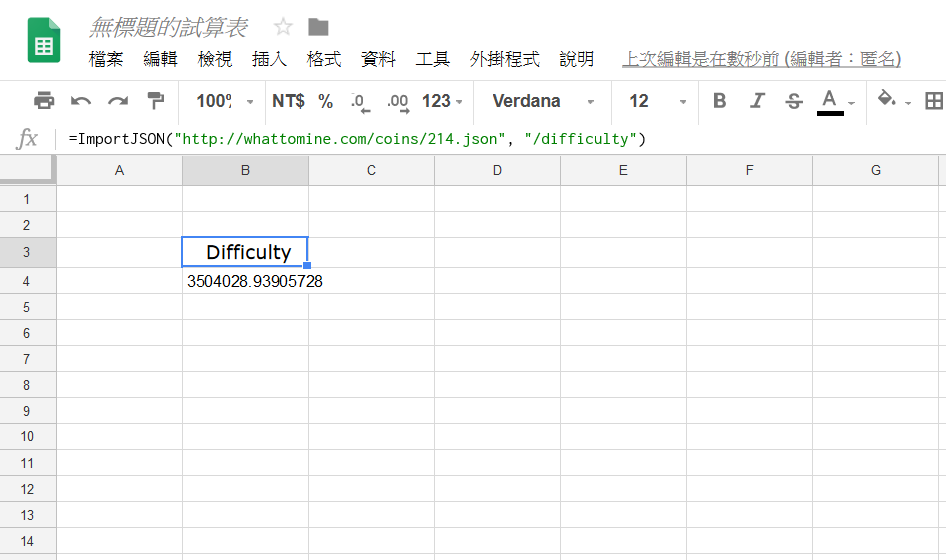
mtompkins commentedon Mar 13, 2018
Using https://gist.github.com/allenyllee/c764c86ed722417948fc256b7a5077c4
I get 4 responses
allenyllee commentedon Mar 14, 2018
Hi @mtompkins, sorry, I can not reproduce this issue....
mtompkins commentedon Mar 14, 2018
So it's clearly a Google Sheets issue. I created a totally new document, pasted your GIST and it works as you have described. The old sheet doesn't seem to update the function / script correctly. What a pain!
loschguy commentedon May 4, 2018
Try to get Google map API to sort a list of Costco locations. Thanks
Anyway to get "San Bernardino County" for "types" : [ "administrative_area_level_2", "political" ].
please note that some result set might not contain "types" : [ "administrative_area_level_2", "political" ] if data not available.
{
"results" : [
{
"address_components" : [
{
"long_name" : "13111",
"short_name" : "13111",
"types" : [ "street_number" ]
},
{
"long_name" : "Peyton Drive",
"short_name" : "Peyton Dr",
"types" : [ "route" ]
},
{
"long_name" : "Chino Hills",
"short_name" : "Chino Hills",
"types" : [ "locality", "political" ]
},
{
"long_name" : "San Bernardino County",
"short_name" : "San Bernardino County",
"types" : [ "administrative_area_level_2", "political" ]
},
{
"long_name" : "California",
"short_name" : "CA",
"types" : [ "administrative_area_level_1", "political" ]
},
{
"long_name" : "United States",
"short_name" : "US",
"types" : [ "country", "political" ]
},
{
"long_name" : "91709",
"short_name" : "91709",
"types" : [ "postal_code" ]
},
{
"long_name" : "6002",
"short_name" : "6002",
"types" : [ "postal_code_suffix" ]
}
],
"formatted_address" : "13111 Peyton Dr, Chino Hills, CA 91709, USA",
"geometry" : {
"location" : {
"lat" : 34.0141463,
"lng" : -117.7424536
},
"location_type" : "ROOFTOP",
"viewport" : {
"northeast" : {
"lat" : 34.0154952802915,
"lng" : -117.7411046197085
},
"southwest" : {
"lat" : 34.0127973197085,
"lng" : -117.7438025802915
}
}
},
"partial_match" : true,
"place_id" : "ChIJLYJzn2Mtw4ARDSJACuj_XMA",
"types" : [ "street_address" ]
}
],
"status" : "OK"
}
NickB23 commentedon Jul 14, 2018
@allenyllee I'm using your gist https://gist.github.com/allenyllee/c764c86ed722417948fc256b7a5077c4
If I am using your example:
ImportJSON("http://europeana.eu/api/v2/search.json?query=books&rows=0&start=1&profile=facets&wskey=api2demo", "/facets[0]/fields[2]/label", "noHeaders, noTruncate")
My result is Biblionet no matter what I try (tried several accounts, opening different spreadsheets):
while the result should have been:
"Bibliothèque nationale de France"
However when I change it to:
ImportJSON("http://europeana.eu/api/v2/search.json?query=books&rows=0&start=1&profile=facets&wskey=api2demo", "/facets[2]/fields[1]/label", "noTruncate,noHeaders")
I do get the correct answer (1688)!
There seems to be a problem when the first argument is [0].
I'm asking because I want to use the Google Maps API. Whenever I use:
=ImportJSON("https://maps.googleapis.com/maps/api/geocode/json?address=New+York&key={API_KEY_HERE}", "/results[0]/address_components[2]/long_name", "noHeaders, noTruncate")
The result is:
While it should have been "United States":
What am I doing wrong?
allenyllee commentedon Jul 16, 2018
@NickB23 Thanks for your report. You are right, this is an issue. Here is my fixed code https://gist.github.com/allenyllee/c764c86ed722417948fc256b7a5077c4
Below is the test example which query from
/facets[0]/fields[0]/labelto/facets[10]/fields[10]/labelNickB23 commentedon Jul 16, 2018
@allenyllee It's working now! Thanks!
gitboss commentedon Aug 7, 2018
@allenyllee I'm using your gist - https://gist.github.com/allenyllee/c764c86ed722417948fc256b7a5077c4
While using the following example -
=ImportJSON("https://www.reddit.com/r/news/comments/94ssi3/80yearold_medical_marijuana_patient_with_expired/.json?limit=1","/data[0]/children[0]/subreddit","noHeaders")
I expect to get and I get the correct result that is = news
However if I use the following
=ImportJSON("https://www.reddit.com/r/news/comments/94ssi3/80yearold_medical_marijuana_patient_with_expired/.json?limit=1","/data[0]/children[0]/subreddit,/data[0]/children[0]/title","noHeaders")
I expect to get the result = news and 80-year-old medical marijuana patient with expired card jailed for less than an eighth of cannabis
However I the get the entire data under /data[0]/children[0].
What am I doing wrong?
allenyllee commentedon Aug 8, 2018
Just input one path at a time, don't use comma separate with multiple path.
So you need to separate your single request into two items: /data[0]/children[0]/subreddit and /data[0]/children[0]/title.
=ImportJSON("https://www.reddit.com/r/news/comments/94ssi3/80yearold_medical_marijuana_patient_with_expired/.json?limit=1","/data[0]/children[0]/subreddit","noHeaders")
=ImportJSON("https://www.reddit.com/r/news/comments/94ssi3/80yearold_medical_marijuana_patient_with_expired/.json?limit=1","/data[0]/children[0]/title","noHeaders")
dabros commentedon Dec 23, 2018
Is there any way to use wildcards in pathing, or xpath like syntax "//name"?
#71 (comment)
https://gist.github.com/allenyllee/c764c86ed722417948fc256b7a5077c4#gistcomment-2704820
#91 (comment)
bit-of-a-shambles commentedon Feb 7, 2020
Hey I have the following Json array:
and when filtering by
"/Topc/top3"I get all values beginning with top3 when I just want the first. How do I filter out the others?allenyllee commentedon Feb 8, 2020
@Duartemartins your question seems the same as #67 (comment)
Try my gist version: https://gist.github.com/allenyllee/c764c86ed722417948fc256b7a5077c4
bit-of-a-shambles commentedon Feb 10, 2020
Thanks! Yes that works if I change the query to
"/top3".